AI Tools Vector Design

Top 10 AI Tools Revolutionizing Vector Design in 2025

AI Tools Vector Design

AI has transformed things in a way no one imagined. Can you imagine any business solution without AI integration today? Your answer would be ‘no’. Well, with the speed at which AI is advancing, things will undergo a paradigm shift in graphics and designs.

Today, AI tools can help you design, but these are practical tools that automate design tasks with AI & Vector graphics and elevate other creative processes. 

If you are a designer with deadlines and do not want to compromise on quality, there are AI tools that can unlock your creativity and redefine your design skills.

Simply put, AI can act as a valuable assistant in your vector design workflow. However, with overwhelming tools available in the market, how will you choose the best ones? Well, we’ve got you covered on the top AI Tools Revolutionizing Vector Design in 2025, so let’s start.

Best AI Tools Revolutionizing Vector Design in 2025

Dive into the leading AI tools reshaping vector design by enhancing precision, streamlining workflows, and transforming creative output across design platforms.

1. Adobe Illustrator

This is one of the best vector AI design tools available today. You can design customized vector graphics with the tool. The best part is that it lets you create, edit, and scale different vector graphics to match your design tone.

Attributes:

The tool lets you iterate on design concepts to create editable graphics. The text-to-vector graphic feature is a notable feature (of the tool). Also, by typing simple descriptions, you can customize, scale, subject scenes, and icons.

Spotlight:

There is a unique AI vector generator that can refine and customize your output.  As such, you can use your artwork as a reference to create new vectors.

2. Kittl

Next on our list is Kittl. It can let you generate vector design images from prompts to icons. The plus point is that you can transform your prompts into veritable vectors in seconds. 

Attributes:

You can edit design-ready vectors by adjusting colors, sizes, and shadows. Integrate these in your layouts to give a new look. The tool is designed to help you achieve a professional-looking vector design, which will stand out. You can maintain the sharpness of your design without losing the quality. 

Spotlight:

The AI vectorizer can convert images into editable vector graphics. Kettl comes with advanced editing capacity and high-resolution results.

3. Canva

Canva needs no introduction. It’s the most popular graphic design tool. If you are a designer, you might already be using it. Canva can create scalable vector images for your design project. With its effective text-to-vector tool, you need to enter an image description, customize the look, and seamlessly get the desired output. 

Attributes:

With Canva, you can create vector graphics in 40+ different art styles. Also, get up to 4 image options in scalable vector format. Canva offers endless creative possibilities and infinite scalability options. In addition, you can seamlessly incorporate the tool into any vector design. 

Spotlight:

With Canva, you can create your vector image using the Gen AI design tool.

Also Read: 10 New Canva Magic Ideas

4. Vectr

Dynamic and stunning vector graphics can stand out and give you an edge over competitors. With Vectr, you can precisely do that. The tool can help you design vector graphics effortlessly. How? From removing backgrounds to converting JPG to vector icons, you can do it all. 

Attributes:

It comes with an effective SVG editor that lets you create desired graphics from scratch. Also, you can convert any image format to SVG to transform your design in minutes. And you know what? You can scale up your raster-to-vector conversions at an unprecedented pace.

Spotlight:

Vectr Gen AI tool ensures high-quality prints. In addition, the tool offers real-time collab and cross-platform synchronization.

5. CorelDRAW with Vector FX

CorelDRAW is a popular tool, and most designers prefer it to create stunning art forms. But you know, you can create exceptional vector graphics using the Gen AI feature of the tool! 

You can make a perfect vector design using its text-to-vector tool. The user-friendly interface of the tool offers scalable, customizable, and professional vector designs. 

Attributes:

It comes with Gen AI technology that converts text descriptions to high-quality vector graphics. The advanced control feature can help you manage vector complexity, nodes, and objects. Also, with seamless integration, you can export your vector creation to other devices. 

Spotlight:

The best part is that you can customize and manipulate every aspect of your vector design.

6. Recraft

Recraft is an ideal choice for your vector designs with high-quality SVG files. It is time to say goodbye to pixels, as you can use text prompts to make vector images. With the Recraft AI vector generator, you can create vector art for logos, banners, mockups, icons, and posters. 

Attributes

It comes with a concerted workforce and inventive freedom. Meaning, you can create state-of-the-art quality vector images with a consistent approach. Also, you can create branded vector designs for sites and apps in seconds. The icon generator is a game changer here, and you can create unique sets of icons with an AI vector image maker. 

Spotlight

Recraft is the only tool that allows you to generate desired vector images of any length or size.

7. Vector Art AI

Are you looking to design scalable vector art images using SVG? You can use vector art AI. Regardless of images, icons, logos, and art illustrations, you can use the tool for every design. In short, you can create wonderful vector images with simple AI tools.

Attributes: 

It comes with a feature for writing text-to-image prompts. Also, you can sketch an image and explore different illustration styles. Besides royalty-free usage, you can try an inspirational free image gallery.

Spotlight: 

There are AI vector image illustration sets to choose from. For example, you can choose from flat circles, playful strokes, and raw forms.

8. Brushless AI

Next on the list is Brushless AI. The tool is adept at creating vector illustrations in no time. Also, it proposes customizable vector images suitable for creative and design people. 

Attributes:

It comes with prompt-based illustration creation, which saves time and helps explore different visual ideas. Also, you can choose from different styles, specially tailored to various aspects and needs.

Spotlight:

The notion style is inspired by minimalist design and simple geometric strokes with precise angles. Structured style is ideal for corporate designs. The soft, organic shapes give a human touch to vector images.

9. Illustroke

Illustroke is a handy AI tool to generate quick vector images from text prompts. Also, the tool helps you generate icons, illustrations, and logos in no time.

Attributes:

By using a simple text prompt, you can generate a vector design image. Besides high-quality prints, you can change the colors and shapes of vector images. 

Spotlight

You can use a suite of AI tools from Illustroke to cover all your design needs.

10. Phot AI

The last one on the list is Phot AI. You can transform your ideas and art into stunning images with this vector tool. 

Attributes:

The tool is ideal for professional branding and social media content. You can elevate your design with its cutting-edge vector generator art tool. In addition, you can create customized designs with the vector generator tool. 

Spotlight:

With its user-friendly interface and AI-powered creativity, you will stand out from the rest.

Choose the Best Vector AI Design Tool 

If you want to be a vector design pro, you can consider AI tools. However, look for the feature set, compatibility, and ease of use.

It is also essential to check export options and integration features. Adapting new AI tools for vector design is a part of your journey, so do it in the right way.

As vector tools become smarter, businesses are turning to Artificial Intelligence services to streamline design processes, enhance creative efficiency, and unlock new opportunities.

With AI tools, you can create logos, images, and icons without losing their sharpness. It’s your time to harness the power of AI tools for vector design.

Short AI Review

Short AI Review: The Ultimate Video Generator for 2025!

Understanding Short AI

Short AI

Short AI is a smart, easy-to-use platform that helps creators make amazing short videos without editing skills. With just a few clicks, anyone can turn ideas into catchy videos, grow their audience, and boost engagement. The platform features tools like the AI Caption Generator and faceless video creation, letting users focus more on creativity and less on time-consuming editing tasks.

One of the highlights of Short AI is its ability to automatically create different types of videos, including story videos, dialogues, and even fake text conversations. These features help your videos stand out and grab attention, making it easier to go viral on platforms like TikTok and YouTube. Not only does Short AI let you create videos quickly, but it also helps schedule and publish your content, saving you hours each week.

Even if you’re just starting, Short AI is simple to use and doesn’t require any video editing background. With tools designed for both beginners and experienced creators alike, making high-quality short videos is now accessible to everyone. You can easily match your video style with your channel and choose different subtitle options to make your posts more engaging and professional.

Whether you want to auto-generate subtitles with near-perfect accuracy or create viral faceless videos, Short AI has everything you need in one place. Plus, it supports over 32 languages, making it ideal for creators all around the globe. Just imagine having the power to create, edit, and schedule multiple videos for a whole week in just a single day!

Features That Make Short AI Stand Out

Short AI Caption Generator

If you want to make amazing short videos easily, Short AI is the tool you need. With its modern technology, Short AI makes creating and scheduling eye-catching, faceless videos a breeze. Loaded with powerful features like the AI caption generator, story video creator, and fake text video builder, Short AI helps content creators, even beginners, to produce professional videos without needing any editing skills. Let’s take a closer look at what makes Short AI truly special.

  • Ultra-fast video generation – create pro-level shorts in just 1-2 minutes, saving you tons of time every week.
  • AI Caption Generator lets you add dynamic, fun subtitles to your videos with over 99% speech-to-text accuracy, supporting more than 32 languages.
  • Easily turn stories and even Reddit threads into engaging short videos with the AI Story Video generator.
  • Make cool, realistic fake chat or text videos fast using the Fake Text Video tool – great for creative and meme content.
  • No editing skills needed – just choose a template, type in your script, and let Short AI do the magic.
  • Schedule your posts on TikTok and YouTube with the built-in social media scheduler, so you never miss an upload.
  • Supports faceless video creation, letting you grow your channel even without appearing on camera.
  • Trusted by over 10,000 creators who see more views, engagement, and ad revenue, just by using Short AI’s tools.

From viral shorts and story videos to unique online dialogues and fake text message videos, Short AI gives everyone the chance to shine online. Whether you want to grow on TikTok or YouTube, grab the power of tools like the AI caption generator and let your creative ideas soar.

A Step-by-Step Guide on Using Short AI

Ready to create amazing short videos with Short AI? Here’s a simple guide that will walk you through every step. Whether you want to generate faceless content, add captions with the AI caption generator, or just save time by scheduling your posts, Short AI makes it easy for everyone—even if you’ve never edited a video before.

  1. Sign Up or Log In: To get started, head over to the registration page if you’re a new user, or log in if you already have an account. Setting up is quick—just enter your details and you’re good to go.
  2. Choose a Tool: Once inside, pick the feature that matches your needs. For making captions stand out, try the AI Caption Generator. If you want to make story videos, fake texts, dialogues, or Reddit story videos, just select the relevant option from the dashboard.
  3. Upload or Create Content: You can upload your own video or script, or let Short AI help you create one. For faceless videos, just enter your script and the AI will automatically generate the visuals and voiceover.
  4. Customize: Personalize your content with different subtitle styles, emojis, GIFs, or image highlights. The AI caption generator supports over 14 subtitle styles to make your captions pop!
  5. Review & Edit: Preview your video right away. If you see something you’d like to tweak, you can quickly edit subtitles, effects, or the arrangement. All edits happen in the same place—simple and fast.
  6. Download or Schedule: When your video is ready, download it to your computer or use Short AI’s social media scheduler to plan when it will post on YouTube or TikTok. You can manage everything from one dashboard, saving tons of time.
  7. Grow and Monetize: Once your videos start getting noticed, join TikTok’s Creator Rewards Program or YouTube’s Partner Program to start earning directly from your videos. With Short AI, professional results are just a few clicks away!

You see, with Short AI, becoming a video creator is as simple as following these steps. There’s no complicated software, no heavy editing, and no experience required. All the cool features like the AI caption generator, faceless video options, and easy scheduling are built in to help you succeed. Try it today and watch your ideas go viral !

Target Audience for Short AI

Short AI is designed for a wide range of users who want to create engaging, professional short videos quickly and easily. Whether you are new to making videos or already have experience, Short AI can help you achieve your goals. Its main users include content creators, social media influencers, and small business owners who want to boost their online presence. Even if you don’t have advanced editing skills or a large budget, you can make videos that stand out using Short AI’s smart features.

For young creators or people who prefer privacy, faceless video tools are a big plus. This means you can make fun, catchy videos without showing your face, keeping your personal life private. Teachers and students can also use Short AI to make educational content that is both informative and entertaining. Busy people will enjoy how Quick the AI processes are, allowing them to create, edit, add subtitles, and schedule posts all in one place. The platform supports over 32 languages, so creators from around the world can easily use its features.

  • Social media influencers wanting to expand their audience on platforms like TikTok and YouTube
  • Aspiring content creators who wish to make viral videos without spending hours editing
  • Businesses and brands needing eye-catching promotional content
  • Educational creators, including teachers and students, for engaging learning material
  • Anyone looking for a free AI short video generator to automate video creation

In short, Short AI is for anyone who wants to quickly make high-quality short videos, draw more viewers, save time, and even start earning money from their online content. If you want to join these users, check out the cartoon talk script tool or explore more video ideas in the explore section to start your creative journey.

Affordable Pricing Plans for All Creators

Short AI Pricing

Finding the right tools for creating amazing videos shouldn’t cost a fortune. That’s why Short AI offers a variety of pricing plans designed for creators of every level. Whether you are just getting started or already have a growing channel, these affordable options make it easy for everyone to access powerful ai caption generator features and more.

Let’s take a closer look at what each pricing plan provides, so you’ll know which one suits your needs best. From the Basic to the Enterprise plan, each option comes with generous credits and unique perks to help you focus on what matters – making great content!

  • Basic Plan: Perfect for beginners who want to try out the platform. Get 160 credits every month, which you can use to create up to 40 faceless videos or generate 53 minutes of auto captions. You’ll also have access to unlimited AI script generation, auto captioning, posting directly to TikTok and YouTube, and can upload videos up to 300MB.
  • Pro Plan: This is the most popular choice among creators. With 360 credits per month, you can make up to 90 faceless videos or generate 120 minutes of captions. It unlocks both Basic and Pro voice options for your videos and includes all the features of the Basic plan.
  • Enterprise Plan: Built for creators or businesses with bigger needs. Enjoy 720 credits every month, create up to 180 faceless videos or 240 minutes of auto captions, and upload files as large as 500MB. Like the Pro plan, this includes both Basic and Pro voice capabilities along with all standard features.

No matter which plan you choose, you’ll enjoy the ability to generate stunning, faceless videos and brilliant AI-generated captions quickly and easily. Short AI is all about saving you time and boosting your channel growth.

Plus, by choosing yearly billing, you can save up to 15% on your plan! So you get more credits, more features, and all the benefits of the ai caption generator and other handy tools, for less. For more details or to compare plans, visit the official pricing page.

Final Thoughts on Short AI

After exploring all that Short AI has to offer, it’s clear that this platform is more than just an AI caption generator. It stands out for letting anyone – beginners or pros—create professional, faceless videos and super engaging captions with just a few clicks. If you’re looking to save time and make your content stand out on TikTok, YouTube or Instagram, Short AI gives you all the tools you need in one easy place.

Short AI transforms your ideas into viral short videos in only 1-2 minutes, and lets you schedule posts so you never miss an upload. With over 99% speech-to-text accuracy, support for 32+ languages, and a variety of subtitle and style options, your videos will look polished and reach a wider audience. Time-consuming editing and uploading are taken care of for you, freeing up hours every week so you can focus on creativity and growing your channels.

Real users, from story creators to industry experts, praise Short AI for how much it simplifies their workflow and drives up engagement, followers, and ad revenue. Automatic captions, inspirational templates, Reddit stories, fake texts, and dialogue video options mean you always have new content ideas at your fingertips. Plus, features are constantly developing, so you can count on even more ways to boost your content in the future.

Ready to stand out online and save time? Give Short AI a try and watch your content and channel grow. For more details on pricing and free trials, check out the pricing page.

.

AI-Powered Google Photos

7 Features of AI-Powered Google Photos Editing You Must Try

AI-Powered Google Photos

Recently Google has implement their Google Photos apps with AI capabilities to make our lives easier. So for Android users including me, as the majority of gadget users, you no longer need to rely on third party apps just to edit you photos. Or some of us relied on few photo editors for different editing purposes. Now everyone can make life easier with AI-Powered Google Photo. Know these 7 AI features of Google Photos.

1. Magic Editor

Put everything in its perfect place. Just tap, brush, or circle an object to move. You can also resize objects with a pinch with AI-Powered Editor.

2. Magic Eraser

So long, distractions. Remove unwanted objects and more in just a few taps with AI-Powered Magic Eraser.

You may also like: 9 Websites To Create Presentations With AI In Seconds

3. Camouflage

Focus on what matters. Change the color of an object so it pops out or blends into its surroundings with AI-Powered Camouflage.

4. Photo Unblur

The most photo problem since ‘ancient time’ – blurred image. Now AI-Powered Photo Unblur improves out-of-focus blurry photos, both new and old.

5. Portrait Light

Improve lighting and brightness, even after the photo is taken and make everyone look amazing – even when the lighting isn’t with AI-Powered Portrait Light.

You may also like: Common Network Security Gaps That Put Businesses At Risk

6. Cinematic Photos

Turn your moments into movies. Bring your pictures to life by turning them into moving 3D videos with AI-Powered Cinematic Photos.

7. Portrait Blur

Turn a photo into a portrait by blurring the background post-snap with AI-Powered Google Photos Portrait Blur.

All of these AI features are so far free (and unlimited using), but there might be some limitation based on the devices requirements (as stated in their website) and some device might not yet supported. For more info related to device minimum requirement, look at https://support.google.com/photos/answer/6128850?visit_id=638835901352665575-936314737&p=editing_features&rd=1.

creative AI Tools

15 Creative AI Tools for Designers & Artists

creative AI Tools by Adobe Firefle

There’re a lot of AI Tools we can find today, but looking for a perfect tool for specific task especially in creative industry is not that easy. But once we get the right AI Tools, the job will be easy, time saving and boost our productivity.

Selection of 15 creative AI Tools in brief that we shared here are purposely for designers and artist. We will add on later with more AI creative tools that might be useful for designers. Do you have any recommendation..? Please put it in the comment section..!

1. Adobe Firefly

creative AI Tools Adobe Firefly

Adobe Firefly is technically a generative AI tool with it’s 4 main tools – Generative Fill, Text to Image generator, Generative Extend & Generate Video tool. Besides as part of the larger Adobe Creative Cloud toolkit for designers, Adobe Firefly can also be access as a separate web app or as part of Photoshop, Illustrator or other Adobe desktop software.

Download

2. Designs.Ai

Designs.Ai is a collection of generative AI tools in one place (and they managed to get the most wanted domain name). They are actually from the same company with Pixlr, one of the popular free online image editing for designers as Photoshop’s alternative. As an all-in-one creative Ai tools, it has more than 10 AI-powered tools; AI Design, AI Audio, AI Chat, AI Draw, Image Maker, Video Maker, AI Writer, Design Maker, Logo Maker, Speech Maker, Face Swapper, etc.

Download

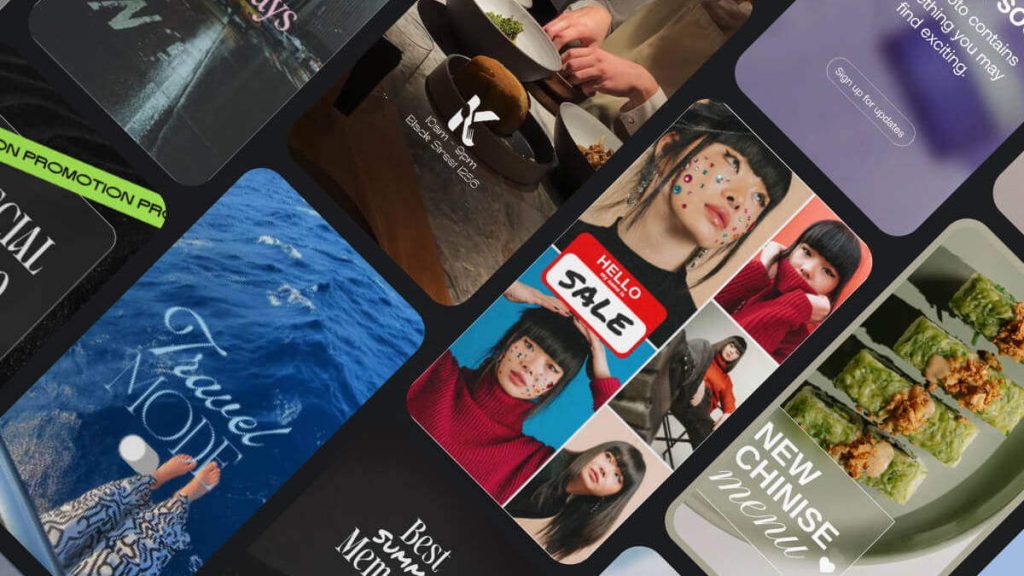
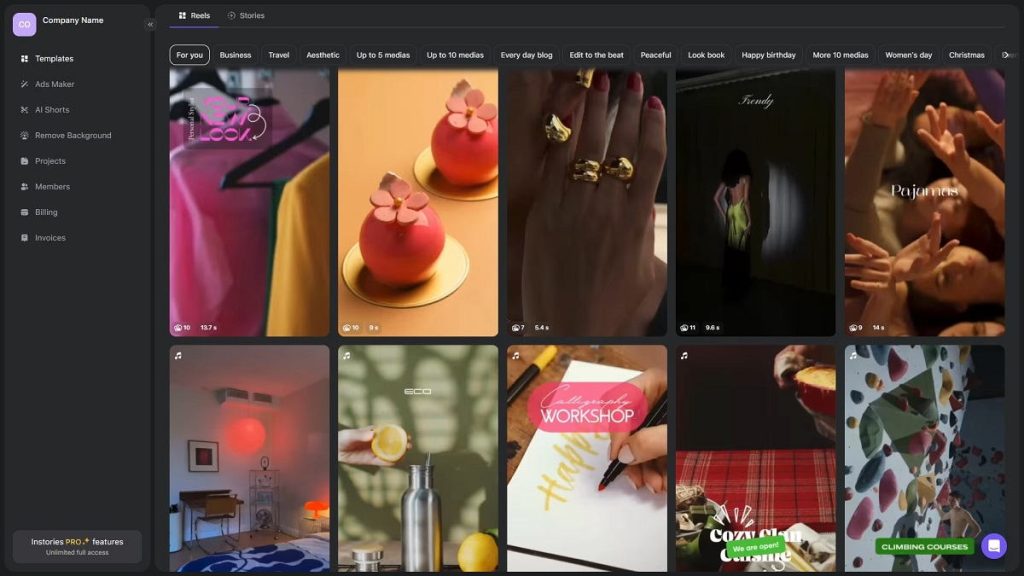
3. Instories — AI-Powered Photo Editor and Story Maker

Instories is a free online photo & video editor and content creation tool that combines powerful AI features with beautiful, ready-to-use templates for social media. Designed for creators, influencers, and small businesses, Instories helps you turn ordinary images into professional-looking stories and posts in minutes. It’s easy-to-use interface, perfect for quick photo touch-ups. Wide variety of modern filters, customizable templates and great all-in-one solution for editing photos and creating social media content.

Download

4. Vance AI

VanceAI is an AI powered all-in-one photo editing toolkit, excels in image enhancement and photo restoration. It offers image editing, photo enhancer, image enlarger, up-scaler, image denoiser, photo sharpener, colorizer, restorer, cartoonizer, background removal and many more.

Download

You may also like to read: 5 Benefits of Using Image-to-Text Conversion in Business Documents

5. Microsoft Copilot

Microsoft Copilot is an AI powered tool to help people with a range of tasks and activities on their devices. Copilot can helps in drafting of contents, suggest different ways to word things you’ve written, suggest and insert images or banners, create PowerPoint presentations from Word documents and many other helpful things. One of the popular tool is Bing Image Creator.

Download

6. PNG Maker

PNG Maker is not a background remover tool, but an Image Generator using text prompt to creates no background or transparent background image, a true PNG image generator.

Download

7. DaVinci

DaVinci is an AI tool for creating AI arts using only your words in just a few seconds. DaVinci intuitive AI art generator is designer and artist dreams to convert imaginations and ideas into real life artworks just by entering a prompt and explaining the style.

Download

8. Videoleap

VideoLeap

Videoleap is an AI powered video editor that makes complex video editing simple and accessible for anyone, from beginners to pros. A must video creation tool for creative editors, learn more on what this intuitive creative video tool can do on their blog.

Download

9. Galileo AI

creative AI Tools Galileo AI

Galileo AI is a generative AI for user interface design. Use Galileo AI to creates and designs website & app user interfaces. There are 2 types of UI creation you can choose to generate – using text based and also using concept image based.

Download

10. Trint

creative AI Tools

Trint is an automated transcription software to convert video, audio and speech to text in more than 40 languages with up to 99% accuracy. Tell stories faster by transcribing, translating, editing and collaborating in a single workflow. So this is a reverse of AI conversion from Text prompt to Image or Video.

Download

11. Descript

creative AI Tools

Descript is something like Trint (above), converting videos to text. It helps to edit your videos & podcasts just by typing. Descript’s powerful AI editing tools let you generate descriptions, tutorial videos, podcasts & short clips fast.

Download

12. ChartAI

ChartAI is an AI tool for generating charts, diagrams and maps just in seconds. An innovative tool developed by AHILAB, designed to provide users with a streamlined experience in data handling and visualization. Easy-to-navigate interface, ChartAI allows users to import data, generate synthetic datasets, and visualize data in a clear and concise manner through a variety of functionalities and creative outputs.

Download

13. Character.ai

Character.AI empowers users to connect, learn and tell stories through interactive entertainment. Millions of people visit Character.ai every month, using their app to supercharge their imaginations. It feels like real conversation, fun to talk and life like AI characters.

Download

14. ImageFX by Google

ImageFX is a new tool in Google’ Labs that lets people create images with simple text prompts. ImageFX includes a prompt interface featuring ‘expressive chips’ that let you quickly experiment with adjacent dimensions of your creation and ideas.

Download

15. MusicFX by Google

creative AI Tools

MusicFX is an another Google Lab’s AI generated effects for music. Users can now create tunes up to 70 seconds in length and music loops, explore prompts with expressive chips and download or share their creations with friends.

Download

15+1. TextFX by Google

TextFX is an AI experiment that uses Gemini, Google’s most capable generative AI. There are 9 tools designed to expand the writing process by generating creative possibilities with text and language. TextFX has inspired many users empowering their writings, lyrics generating, contents creation, etc.

Download

Question AI

Question AI Review: Meet the Free AI Homework Helper Transforming Education

Question AI

In the age of digital learning, students across the globe are constantly seeking innovative tools to aid in their academic endeavors. Among the plethora of available resources, Question AI stands out as a premier choice for students looking for efficient homework assistance. 

This revolutionary Homework AI tool leverages state-of-the-art artificial intelligence to provide help with a wide array of subjects, promising a new level of academic support. This review delves into the features, reliability, and comprehensiveness of Question AI, spotlighting its role in the current and future landscape of educational technology.

Question AI

Transforming Homework with AI

The Power of Homework AI Solver

The advent of Question AI introduces a momentous shift in how students approach their studies. Equipped with a dynamic AI homework helper, this online platform offers unparalleled support in solving complex and time-consuming assignments. Its ability to produce detailed solutions across diverse subjects such as mathematics, chemistry, biology, physics, literature, and history showcases its versatility and effectiveness.

Accessibility and User Experience

A notable aspect of Question AI is its commitment to 24/7 accessibility. Recognizing the global nature of its user base, the platform ensures that help is available anytime, accommodating different time zones and schedules. Furthermore, the tool’s design prioritizes a user-friendly interface, making it easy for students to navigate and submit queries whether through typing or uploading documents and images.

Question AI offers students support across a wide range of academic tasks with an impressive 98% accuracy. The advanced AI technology provides in-depth solutions to even the most difficult homework and exam questions. 

Free Access to Revolutionary Learning

What sets Question AI apart in the realm of educational tools is its provision of services free of charge. This attribute not only democratizes access to high-quality educational support but also presents Question AI as a pivotal solution for students aiming to enhance their learning without financial burden. By offering its advanced homework AI solutions at no cost, it stands as a testament to the possibility of blending excellence with accessibility in education.

A Deep Dive into Question AI’s Offerings

Question AI

Unmatched Accuracy in AI Homework Help

The core of Question AI’s effectiveness lies in its unmatched accuracy, boasting a 98% accuracy rate in the solutions it provides. This impressive statistic is attributed to its sophisticated use of advanced algorithms and machine learning models that are constantly updated to refine and improve the accuracy of answers.

Detailed Solutions across Subjects

Another highlight of Question AI is its dedication to providing detailed, step-by-step solutions. For students, this means not just receiving an answer but understanding the methodology behind it, which is crucial for long-term learning and comprehension. From algebraic equations and chemical reactions to analyzing literary texts and historical events, Question AI equips students with the knowledge to tackle similar questions independently.

Multilingual Support Enhancing Global Learning

Acknowledging the linguistic diversity of its users, Question AI offers support in over 100 languages. This feature ensures that language barriers do not hinder access to top-notch educational assistance, making it a truly global tool for students around the world.

You may also like How To Utilize A People Search Directory To Find Peoples Information

Maximizing Benefits with Question AI

To fully leverage the capabilities of Question AI, students are encouraged to integrate this tool into their study routines. Whether tackling daily homework or preparing for exams, the regular use of it can help reinforce learning, clarify doubts, and improve academic performance. By presenting both the question and its solution, it also helps students learn how to approach problems systematically and efficiently.

Conclusion

Question AI emerges as a beacon of innovation in the realm of digital education, providing a comprehensive, accurate, and free homework AI solver that caters to a myriad of academic needs. Whether for quick homework solutions or deepening understanding in various subjects, it exemplifies the transformative potential of artificial intelligence in education. As technology continues to evolve, tools like Question AI not only support academic success but also inspire a new generation of learners to explore, question, and ultimately, excel.

.

FlexClip AI Video Editor

FlexClip Review 2024: Comprehensive Analysis of Advantages, Disadvantages, Hidden Features

FlexClip AI Video Editor

In the ever-evolving digital landscape, the demand for video content continues to soar, with platforms like YouTube witnessing an astounding 500 million hours of video watched daily. Furthermore, videos have demonstrated unparalleled shareability, generating a staggering 1200% more shares on social media compared to text and image content combined. In light of these trends, businesses and marketers are increasingly recognizing the pivotal role of video creation in effectively engaging with their digital audience.

Traditionally, the creation of professional-quality video content was shrouded in complexity, requiring expensive tools and technical expertise, thereby limiting accessibility. However, the emergence of FlexClip in 2024 has heralded a new era of democratized video editing, making it accessible to users of all skill levels.

What is FlexClip?

Developed by PearlMountain Technology Co., Ltd. in China, FlexClip has swiftly ascended the ranks among content creators, marketers, and businesses worldwide. At its core, FlexClip serves as an online video maker and editing platform, offering a comprehensive suite of tools and features meticulously crafted to address a diverse array of video creation needs.

Key Features of FlexClip

Customizable Video Templates: With an extensive repository of over 1000 pre-made templates spanning various use cases, FlexClip empowers users with a myriad of options to kickstart their projects.

FlexClip Templates

Massive Stock Media Library: Boasting an impressive collection of over 1,000,000 royalty-free video clips, images, graphics, and music tracks, FlexClip ensures that users have access to a boundless reservoir of resources to elevate their videos.

AI-powered Editing Tools: Harnessing the power of artificial intelligence, FlexClip streamlines the editing process by offering innovative features such as text-to-video conversion and automatic subtitling.

Drag-and-drop Timeline Editing: With an intuitive drag-and-drop interface, users can effortlessly arrange and edit their video clips, transitions, effects, and overlays, fostering a seamless editing experience.

Audio Editing and Voice-over Recording: Recognizing the significance of audio, FlexClip provides users with advanced editing capabilities and a built-in voice-over recording tool, facilitating seamless narration.

Collaboration Tools and Cloud Storage: Through features like team projects, sharing, comments, and task management, FlexClip fosters collaboration among users, facilitating seamless teamwork on video projects.

Publishing & Analytics: FlexClip simplifies the process of publishing videos with one-click export options and detailed analytics to track performance, empowering users to optimize their content strategy.

FlexClip’s User Interface and Ease of Use

FlexClip UI

Distinguished by its user-friendly interface, FlexClip caters to users of all proficiency levels, offering a seamless editing experience characterized by a drag-and-drop approach. The interface is thoughtfully divided into sections such as the Media Library, Timeline, Preview Window, and Editing Tools, ensuring intuitive navigation and comprehension.

FlexClip’s Key Features and Capabilities

FlexClip Chroma Key

In addition to its core features, FlexClip encompasses a plethora of advanced tools powered by artificial intelligence, including text-to-video conversion, auto subtitles & captions, and smart video cropping. These innovative features not only streamline the editing process but also empower users to create professional-quality videos with unparalleled ease.

FlexClip’s Performance and Output Quality

FlexClip 4K Video quality

Leveraging cloud-based rendering, FlexClip ensures swift performance and high-quality output, supporting various video resolutions, including 1080p and 4K. Furthermore, the platform offers multiple export options to cater to diverse needs, delivering sharp and clear videos suitable for professional applications.

AI-Powered Editing Tools

Incorporating artificial intelligence to accelerate mundane production tasks is a growing trend across creative platforms. FlexClip offers cutting edge AI functionality to simplify the video creation process.

Rather than needing to storyboard shots manually, just type up a narrative script and let FlexClip’s AI automatically generate an entire video from text. This includes:

  • Shot selection from stock library
  • Animated text matching script narrative
  • Background music pairing
  • Professional scene transitions
  • Text to speech conversion (95 languages)

It only takes seconds to produce an initial AI-powered video. Refine from there or use as a baseline to build upon.

Struggling to conceptualize what a marketing or social media video should even cover? Describe the general topic and target audience and FlexClip will auto-generate an entire script outline incorporating SEO best practices – perfect to then transform into a video.

Manual transcription and caption creation takes forever. FlexClip’s AI can listen to video dialogue and automatically generate subtitles and closed captions – crucial for improving video accessibility.

  • Text to Speech: With the text-to-speech feature, users can easily add voiceovers to their videos by simply inputting text, which the AI will convert into natural-sounding speech.
  • AI Image Generator: Need a specific image for your video? FlexClip’s AI image generator can create custom visuals based on your prompts.
  • Background Remover: Easily remove backgrounds from images and videos with FlexClip’s AI-powered background removal tool.
  • Smart video cropping
  • AI-powered color grading
  • Photo animation effects
  • AI translator:translates the video content into another language

You may also like: Flexclip Free Video Editor That Easily Create Stylish Video Online

FlexClip’s Pricing & Plans

FlexClip adopts a flexible pricing model tailored to accommodate the needs of different users. While the free plan serves as a stepping stone for beginners, the Plus and Business plans cater to individuals, small businesses, and larger teams or enterprises, offering advanced features and capabilities commensurate with varying requirements.

Pros
  • User-friendly interface
  • AI-powered features
  • Competitive pricing plans
  • Over 4 million stock media
Cons
  • Watermark on free plan

Conclusion

In conclusion, FlexClip emerges as a versatile and user-friendly video editing platform that empowers users of all proficiency levels to create professional-quality videos. With its comprehensive suite of features, intuitive interface, and competitive pricing, FlexClip epitomizes accessibility and innovation in the realm of video editing, poised to retain its position as a preferred choice for video creators in 2024 and beyond.

AI detector remover

Humbot Review: The New Era of GPT Detectors and AI Detection Removers

AI detector remover

In the rapidly evolving landscape of artificial intelligence (AI), where content creation and verification have become intertwined with AI technologies, Humbot emerges as a pioneering tool designed to address the growing need for a sophisticated AI detector and AI humanizer. This Humbot review delves into the platform’s capabilities, differentiating it from other tools in the market by focusing on its proficiency in bypassing AI detection and transforming AI-generated content into a format that’s nearly indistinguishable from human-written texts.

AI detector

Understanding Humbot’s Core Offerings

Humbot as an AI Detector and Checker

In an era where AI-generated content is becoming more prevalent, the demand for reliable AI detectors and checkers has surged. Humbot answers this call by providing users with an effective tool to identify content generated by AI models. What sets Humbot apart is not just its ability to detect AI content but also its integrated solutions that offer more than mere detection.

The Anti AI Detector: Bypassing AI Detection

For content creators who navigate the digital world where AI detection tools are increasingly used to filter and scrutinize content, Humbot’s anti AI detector offers a groundbreaking solution. Bypassing AI detection has never been more critical, especially for maintaining the originality and authenticity of AI-assisted content.

Humbot’s AI Detection Remover: An Overview

The Humbot platform features an AI detection remover, a tool meticulously designed to alter AI-generated content in such a way that it evades detection by some of the most popular AI detectors in the marketplace. This functionality is crucial for content creators seeking to ensure their content remains viable and effective in platforms employing stringent AI detection algorithms.

Humbot’s AI Humanizer: Revolutionizing Content Creation

Transforming AI-Generated Text

At the heart of Humbot’s offerings is its AI humanizer technology, designed to humanize AI text by refining and adjusting it to mirror human-like quality and nuances. This component of Humbot not only ensures the content passes as human-written but also maintains the original message’s integrity and readability.

Humanize AI Text: Quality and Originality

The ability to humanize AI content effectively sets Humbot apart. The technology ensures that the humanized content is not only free from grammatical or spelling mistakes but also resonates with readers on a more personal and engaging level. Humbot guarantees that the output is unique, thereby helping users to present content that is original and of high quality.

remove AI detector

Why Humbot Stands Out: Key Features and Benefits

Humbot offers a suite of features that distinguish it in the field of AI content detection and humanization. Its ease of use, coupled with fast processing times, makes it an invaluable tool for various users, ranging from content creators to digital marketers.

Fast, Easy, and Effective

Humbot’s user-friendly interface and efficient processing enable users to quickly rewrite AI-generated content. This speed and simplicity do not compromise the quality of the output, which is a testament to Humbot’s advanced technological backbone.

Comprehensive Bypass for AI Detection

One of Humbot’s most compelling features is its broad compatibility with prevalent AI detection tools in the market, including but not limited to Originality.ai, GPTZero, and Turnitin. This wide-ranging efficacy ensures that content re-written with Humbot’s technology remains undetectable across multiple platforms and services.

Elevating Content to New Standards

Not only does Humbot provide a solution for bypassing AI detection, but it also elevates the quality of AI-generated content to new standards. The platform’s commitment to producing high-quality, humanized text that retains the essence of the original content while enhancing its readability and engagement factor is notably impressive.

You may also like to read: Automating Design with AI & Vector Graphics

Real-World Applications and Success Stories

What truly illustrates Humbot’s effectiveness are the success stories shared by users who have leveraged the platform to tackle real-world challenges. From bypassing sophisticated AI detectors in academic environments to enhancing marketing materials for better engagement, Humbot has demonstrated its versatility and efficiency across a wide range of scenarios.

A Tool for Content Creators and Digital Marketers

Both content creators and digital marketers can find immense value in Humbot’s capabilities. By ensuring that AI-generated content remains original, engaging, and undetectable by AI detectors, Humbot empowers these professionals to produce content that stands out and resonates with their audience.

Navigating the Ethical Considerations

While the power of Humbot to bypass AI detection and humanize AI-generated content opens up new avenues for content creation, it also necessitates a discussion on the ethical implications of such technology. Humbot encourages the responsible use of its tools, emphasizing the importance of honesty and integrity in the creation and distribution of content.

Humbot’s Place in the Future of AI Content Creation

As AI continues to shape the landscape of content creation and verification, tools like Humbot will play a pivotal role in defining the standards for quality and originality. With its advanced capabilities in AI detection, bypass, and humanization, Humbot is not just a tool but a benchmark for future innovations in the field.

Conclusion

In this comprehensive Humbot review, we’ve explored the multifaceted capabilities of the platform, highlighting its position as a leader in the realm of AI content detection and humanization. With its user-friendly interface, robust technology, and commitment to quality, Humbot sets a new standard for how AI-generated content can be utilized, transformed, and appreciated in the digital age. For content creators, digital marketers, and anyone involved in the creation of digital content, Humbot offers a solution that is not just effective but indispensable in ensuring the authenticity and originality of their work.

Credit AI image: Image by Rani Shoket from Pixabay

.

From Canvas to Code: Automating Design with AI and Vector Graphics

Design with AI

The digital design landscape has morphed tremendously over the past few decades. One of the most remarkable transformations is attributed to the evolution from analog-based designs on a physical canvas to digital design through codes and algorithms. Combining artificial intelligence and vector graphic techniques in design with AI has significantly bolstered this shift.

The Intersection of AI and Vector Graphics

At the heart of this evolution is the integration of AI within vector graphics, creating a fusion between machine learning, extensive data analysis, and algorithmic creativity. AI systems powered by sophisticated algorithms are pioneering the generation of vector graphics by delving into the subtleties of design elements such as color coordination, spatial object distribution, and intricate typographic details.

Design with AI

This is where the concept of an AI voice becomes relevant, not as an auditory phenomenon but as a unique manner in which AI influences and guides the creation process, embedding a distinctive digital signature that reflects algorithmic creativity.

AI-driven Vectorization

AI-driven vectorization introduces an automated approach where AI tools transform hand-drawn sketches or bitmap images into precise vector graphics. In this regard, tools such as GIF compressors are particularly notable.

Design with AI

These use machine learning to identify and replicate shapes, lines, and colors from raster images such as GIFs into scalable vector formats. This process showcases the ability of AI to bridge traditional art with the digital world.

Generative Art

Generative art represents another facet where AI intersects with creative design. Here, artists and programmers define a set of algorithms or rules for AI to follow, creating unique, complex outputs that are both diverse and visually captivating. Artists such as Mario Klingemann and Tyler Hobbs have harnessed these capabilities to produce stunning vector-based artworks, pushing the boundaries of what’s possible with AI and algorithms.

Generative art uses algorithms as tools for creation, leading into the field of prompt engineering in artificial intelligence. This discipline uses structured guidelines to improve language learning models’ interpretation and response to inputs, enhancing accuracy and context sensitivity. Such integration of visual and linguistic manipulation demonstrates AI’s broad potential across various media.

You may also like : 15 Sites Where To Sell Your Vector Arts

Advantages of Automating Design with AI and Vector Graphics

  • Efficiency: AI automation dramatically reduces the time required to create complex vector designs, enabling faster creative processes.
  • Precision: Vector designs created using AI exhibit high precision, notably when transforming low-resolution images into high-definition vector graphics.
  • Creativity: AI’s prediction capabilities can suggest new design options by analyzing existing data, unlocking unforeseen creativity.
  • Scalability: Vector graphics are infinitely scalable without losing quality, making them ideal for varying digital platforms and print dimensions.

Expanding Horizons: AI in Collaborative Design Tools

The integration of AI doesn’t stop at automating the design process; it extends into developing collaborative tools that enhance how designers work together. AI-enhanced software can now offer real-time design suggestions, automate repetitive tasks, and predict user needs, streamlining workflow and fostering a more creative and collaborative environment.

This AI-enhanced collaboration revolutionizes traditional design methods, allowing teams to work effectively over long distances. AI-powered tools analyze design choices and provide optimized solutions, improving communication and idea exchange among team members. This accelerates the design process and promotes cohesion through efficient feedback and iterations. The integration of AI into design tools is forging a future where technology and creativity merge, producing previously unimaginable innovative outcomes.

Future Trajectory: AI and Design

Design with AI

The partnership of vector graphics and AI indicates promising potential for the future of digital design. As AI capabilities continue to enhance, we can expect the automation boundary to shift further, including developing AI video tools designed to automate tasks too complex for today’s AI. Such tasks include translating a designer’s sketches directly into ready-to-use digital formats.

While the field of AI-driven automated vector graphics design is still developing, it is undeniable that we are at the precipice of a remarkable time in digital design history. This integration of traditional art with machine learning and vector graphics represents a new era in the creative world. In this era, the canvas isn’t made of cloth but of codes, algorithms, and limitless possibilities.

The field of AI-driven automated vector graphics design is significantly transforming the digital design landscape, merging traditional art with advanced technology. This new era replaces conventional canvases with code, algorithms, and boundless possibilities, allowing for immense creativity and innovation. AI not only makes design more accessible and sustainable by removing physical constraints but also enhances the speed and flexibility of the creative process. This evolution fosters a collaborative space where art and technology coexist, redefining artistic creation and ideation in the digital age.

Embracing the New Dawn

The domain of AI-driven vector graphic design is on a trajectory of continued growth and innovation. At this pivotal juncture in digital design history, the convergence of AI, machine learning, and vector graphics opens a gateway to unprecedented creative possibilities. In this new era, the canvas is not confined to cloth. Still, it expands into codes, algorithms, and infinite possibilities, heralding a future with virtually nonexistent design limitations.

Credit image:
Image by Jan Jakubowski from Pixabay
Image from Voice Cloning
Image by Денис Марчук from Pixabay