cmyk

Printing Guide – ID, PS, Ai, PDF


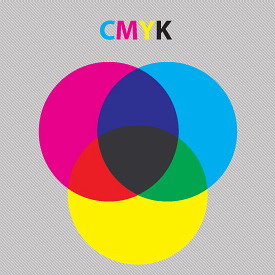
cmyk

The latest Adobe Printing Guide version CS6 for designers, advertising agency, printing and creative industries is a must have printing guide book especially for Adobe design apps users. This free 149 pages ebook by Adobe Design Center focus on mostly used Adobe apps for design and printing production which are:

  • PDF Creation – in Illustrator, InDesign, Photoshop & Acrobat
  • InDesign CS6 – New Features, Preparing InDesign Documents for Output, Working With a Book File, etc.
  • Photoshop CS6 – New Features, Color Mode, Image Format, Printing from Photoshop
  • Illustrator CS6 – New Features, Live Effects, Complex File, Examining Customer Files, Forensic Tools, Printing from illustrator, etc.
  • Acrobat X Pro – Improved Features, Overprint Preview, Print Production Tools, Editing PDF Files, many more.
Adobe Printing Guide


“While this document is focused on the needs and requirements of printers, it is also useful for production artists who are preparing files for print” – Adobe

What This Guide Is Intended to Do

This guide serves as both a detailed technical reference for handling Creative Suite 6 files from your customers, and as a training tool for your staff. For example, this guide will introduce you to forensic tools, such as the Overprint Preview option in Illustrator, InDesign, and Acrobat X Pro, as well as the Output Preview function in Acrobat, all of which are invaluable in highlighting potential problems. The earlier you can pinpoint problems in a job, the less expensive and complicated they are to rectify.

Go get the Adobe Creative Suite Printing Guide

Google Trends in Full Screen

Google Trends
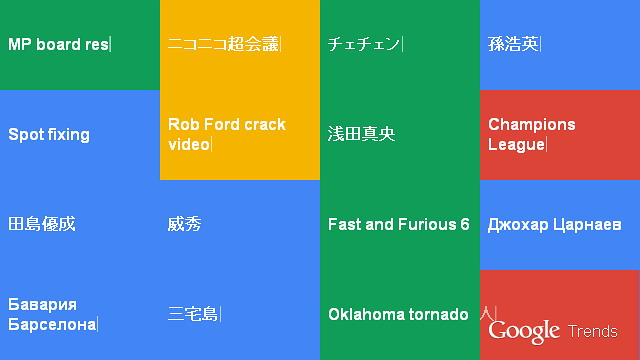
Hot Google Searches visualize in full screen grid

Last couple of days Google has update their Hot Search trending data in visual style. What make it looks cool (or hot) it presented in full screen and best of all we can view it in grid, just choose the grid size (at the top left icon) that suits your screen size. For every keyword shown in the boxes, represents for certain countries. For now it’s only showing searches from 11 countries – US, UK, Canada, Australia, Japan, Russia, Hong Kong and few more. View it in full screen.

Google seems to show how nice the web-tech should be presented, simple, clean and following the new style flat design interface web trends. Also the popular grid style layout with their 4 corporate colors. But I’m not really sure if the Red color represents the hottest keyword searched compared to the other 3, I assume it just random.. and the script renders the output as vector ☺

via googleblog.blogspot.com

Adobe CC Apps

Adobe CS To Adobe CC

Adobe CC
The New Adobe Creative Cloud Apps

Adobe recently (early May) announced the end of Creative Suite (Adobe CS) and they will replaced with the new rebranded Adobe Creative Cloud (Adobe CC). Expect no more Illustrator CS7 or Photoshop CS7 for the next version, but the new Illustrator CC, Photoshop CC instead, and other Adobe apps. So what does this means to users.. well, there will no more Adobe products will be sold in a box in the future as right now. Adobe introduced Creative Cloud paid subscription service for users and this is the only way we will get the new versions of all their products.

Adobe CC Apps
Adobe CC Apps

Adobe Creative Cloud will be available in 17 June 2013, is not actually a cloud service that we might imagine, since the software or the apps itself will be installed locally (in user’s pc), and will not run in the browser. Users will need to verify their subscription once a month and they will get access to the cloud platform for few services provided by Adobe including 20GB storage. You can find out more on Adobe CC FAQ.

Reviews

Following some reviews from top site covering Adobe news, we found many users, designers to be specific, all over the world express their negative feed back to this Adobe’s transition. Many designers said they will stick with the last version of the apps they used, such as Illustrator CS6 and refuse to subscribe (upgrade). Here are some negative reviews:


Pricing

The main concern of haters is the pricing and fees for using Adobe CC apps for long term commitments, but CNet was make comparison among those CS versions vs CC versions, and bear in mind that with Adobe CC you get various apps in the cloud plus other services. See the pricing chart below..

CS cost vs CC cost for 3 years commitment | CNet

Interested to try..? You can start with the cheapest individual fee for only one app, or if your’e student / teacher at $19.99 per month. If you want to try first for free 30 days with limited service, see the pricing options.

Piracy

Some thought that Adobe’s moved to fight piracy as the main concern but ironically the company itself said they could see an increase in piracy since the Creative Cloud apps are running offline and no guarantee the apps could not be cracked. Unless Adobe CC is running live online via browser might reduce this issue.. though it’s not a good idea.

Opinion

Adobe has made a right move along the way and with the popular demand of cloud services especially the continues supports from mobile industry, they’ve moved one step ahead to keep their product brands lead. We could expect more designer’s apps ‘in the pocket’ sooner or later. Did you know Adobe Touch Apps for Android & iOS..?

Photoshop.com To Adobe Revel

Have you been using Photoshop.com free online storage for your photo album..? If you’re using it probably you’ve received their email reminder asking you to move all your photos in your Photoshop.com account to the new Adobe Revel before 18 June 2013, the last date given to users to save (download) all our photos in there. Unless you have your backup offline, you can just ignore it.

Photoshop.com

photoshop.com logo

Previously one of the main feature available in Photoshop.com is free up to 2GB online storage for users to upload photos and the integration with Photoshop Express Editor to edit our uploaded photos in the library (since 2007 if I’m not mistaken).

Photosho.com to Adobe Revel

Seems like Photoshop.com just removes the online storage features from it and remain (or they upgrade) the site as a one-stop Photoshop related stuffs and news.

Adobe Revel

Adobe Revel logo

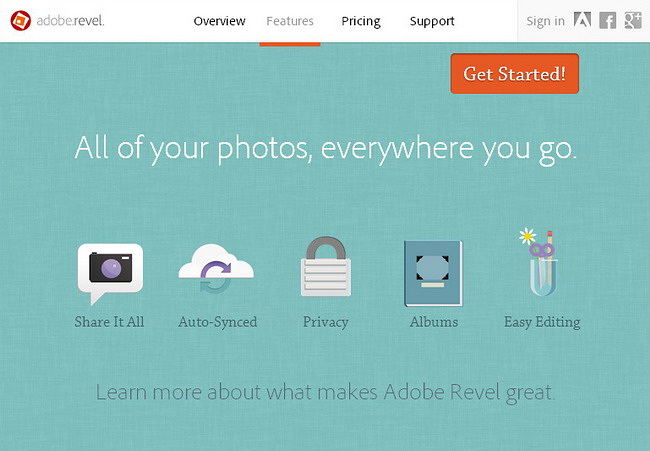
On the other site, the Adobe Revel (it’s the upgrade version of previously paid apps Adobe Carousel), developed as a new cloud storage for users to synchronize photos (jpeg only for now) from any devices just like dropbox, and has the features to share the photos to anywhere with our friends just like instagram (ok no need to explain). Surely (and hopefully) Adobe (will always) consider your photos are your photos, not like Instagram controversial policy previously mentioned – ‘your image belong to us’.

Adobe Cloud

Anyway the move made by Adobe itself considered a good start from the giant design’s software (they should start earlier) as free service besides the paid version, just like Google established their Google Drive, Microsoft with Skydrive, Apple with iCloud and some more familiar brands of free & paid cloud storage.

Comparison of Free vs Paid Adobe Revel

Revel (Free)

  • Unlimited Importing – Free for First 30 days
  • Monthly Import – 50 Photos / month
  • Cost – Free

Revel Premium (Paid)

  • Unlimited Importing – Always
  • Monthly Import – Unlimited
  • Cost – US$5.99 /month
Adobe Revel features

While briefly test the features of Adobe Revel by uploading some photos of mine (I’m bit particular of my personal photos), I’m looking for the ‘private setting’ button on the dashboard – ‘Library’ to be exact. But the interface looks too minimal and I can’t find any setting for the album created or for a single photo to set as private. The answer was actually mentioned in the ‘Features‘..

Every photo you upload and every album you create is private by default.

So no worry for your personal photos every time you sync from your mobile or other devices. Only photos that are save to be shared can manually be share, click button Albums and click on one of your created Albums then menu Share (with icon) will appear, simply click to Share. Well you may try it yourself if you not using it yet.

Pro

Adobe Revel should be the choice of designers especially for Adobe users to use cloud photo sharing and apps.

Con

But for the time being, Adobe still (since Adobe Carousel in 2011) support only for Mac & iPad users, not yet fully support for Windows & Android devices, and perhaps this kind of limitation make it hard to compete with others top Free Cloud Storage available. Sometimes I wonder, ‘does Apple deal with Adobe to keep Revel stick with iOS only’..? Another bad point, it’s only for Jpeg image..!!

Android users still can use it using Adobe Revel Importer, though its not a full version.

Vector Graphic Editors

We list here some of vector specific programs for graphic applications. From well known Adobe products, Corel and some free versions of vector graphic editor for you to try and use as alternatives to these 2 expensive software.

Adobe Illustrator

Ai icon

We can say the most popular of Vector Graphic editor is Adobe Illustrator and it becomes the ‘industry standard’ in vector graphic application for many purposes and media format. Whether we need vector for advertisement, publishing, animation or printworks, it’s a must have application for busineses. What make Illustrator the best choice, probably this program has big supports from users all around the globe, like websites & blogs specifically to Illustrator Tutorials, How-to Tips, YouTube videos, not to forget Plugin downloads, Brushes, and huge Vector resources for free download as graphic elements ready to be use with Illustrator.

Adobe Illustrator CS6 screenshot
  • Latest version: Adobe Illustrator CC
  • Platform: Windows, Mac
  • Format: .Ai

For their latest news see Illustrator blog


CorelDraw

CorelDraw X6 icon

The closest Adobe Illustrator’s competitor by popular user, CorelDraw is one of  the top name in design applications besides their photo/image editor Corel PhotoPaint which has similar function with Adobe Photoshop. What’s good about CorelDraw is, it has the ability to load Adobe Illustrator file, the Ai format, which Illustrator cannot (or refuse) do for CorelDraw file, cdr format.

CorelDraw screenshot
  • Latest version: CorelDraw X6
  • Platform: Windows
  • Format: .CDR


Inkscape (Free)

Inkscape icon

Inkscape is one of the top free Vector Graphic editor. It’s an open source vector editor that produce SVG (scalable vector graphic) image file, a standard vector image that supported by modern web browser. Inkscape also has the ability to open Illustrator files.

Vintage Car by Tim Jones | Inkscape Gallery
  • Latest version: Inkscape 0.48
  • Platform: Windows, Mac
  • Format: .SVG


FreeHand

FreeHand icon

Previously known as Macromedia Freehand (before Adobe take over Macromedia) then it was named Adobe FreeHand until Adobe announced to discontinue the support in 2004. Eventhough Adobe was stopped continuing Freehand update, (that make their fans dissapointed), you can still buy it or try it.

  • Status: Discontinued
  • Last version: Freehand MX (version 11.02) last update 2004
  • Platform: Windows, Mac


Xara Xtreme (Free)

Xar icon

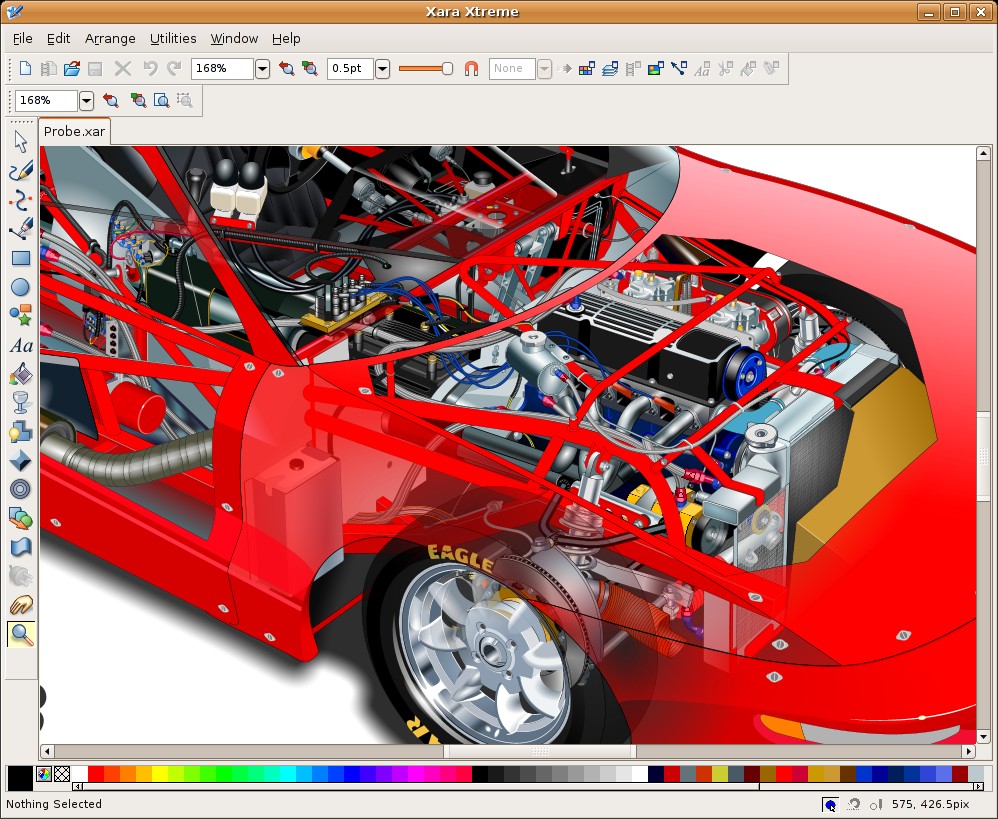
Xara Xtreme is an another free Vector Graphic editor from Xara. Based on the paid version, Xara Designer Pro X, this free version is an open source for Linux based system.

Xara Xtreme screenshot
  • Recommended version: version 0.7 Revision 1692
  • Platform: Linux system
  • Format: .Xar


Serif DrawPlus Starter Edition (Free)

Serif DrawPlus icon 100

An another free Vector Graphic editor from Serif software, DrawPlus Starter Edition has the ability for many common used in vector editor includes support for pen tablet. From some reviews, we can say that its more on drawing tools if you prefer to draw on computer. Surely this free version has features limitation compared to the paid version of Serif DrawPlus X6.

Serif DrawPlus Starter Edition
  • Latest version: DrawPlus Starter Edition
  • Platform: Windows
  • Format: .DPP


Skencil (Free)

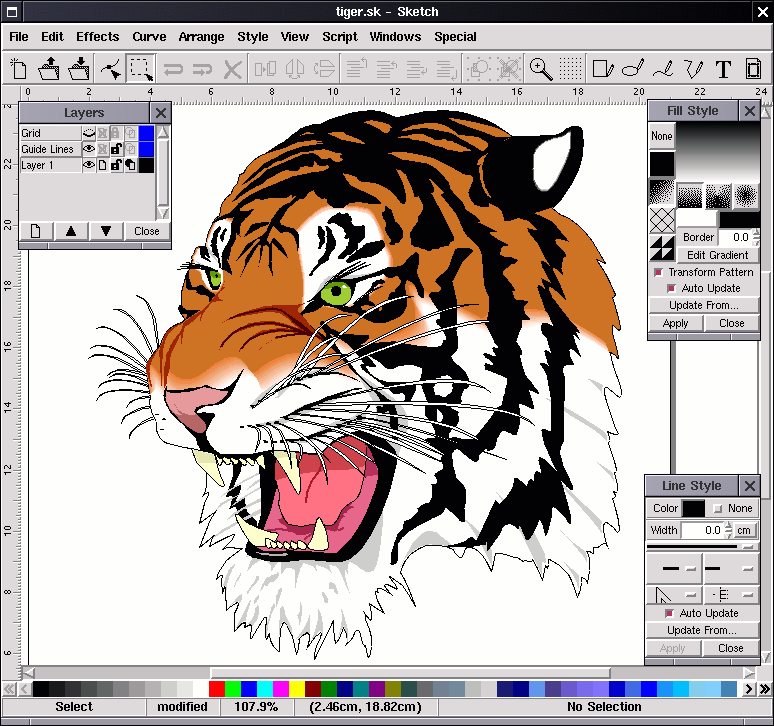
Skencil is another free, open source from sK1 Project team for GNU / Linux / Unix based system Vector Graphic editor. Developed and powered by Phyton, a powerful, object-oriented, high-level interpreted language. Its also import Adobe files.

Skencil
  • Latest version: 0.6.17 (stable version)
  • Platform: Linux / Unix, Windows
  • Format: .sk


Aviary Raven Vector Editor (R.I.P)

This is some good Free Online version of Vector Graphic editor from Aviary, but seems it was dead. Previously they have some graphic product lines from vector to photo editor. Sadly they not managed to continue the development.

Aviary Raven Vector Editor Online Vector Drawing Tool
Aviary Raven
  • Status: R.I.P (dead)
  • Platform: Online


There’re few more vector graphic editors out there and we will try to cover next time, stay tune ☺

The History of Photoshop

Many of us knew about Photoshop more than any other graphic programs. But did we know the history of Photoshop..? It was started in 1987 by Thomas Knoll as his educational purpose to write the computer code for his doctoral study specialised in computer vision. It was later attracted his brother John Knoll who’s at that time worked with a visual effect’s company for George Lucas film. Then they both collaborate in developing the code to works on the first colored system Macintosh II.

photoshop 1 splash
photoshop 1 splash

Here are some of the infos that we might not know about the history of Photoshop:

  • 1987 it was started as a computer code named – Display.
  • The code was created since the black & white era of computer system with the purpose to show greyscale graphic on monochrome.
  • They stuck to name the finished software for selling when the first name they choose – ImagePro and few others are already taken.
  • 1988 finally they come up with a new name, PhotoShop (with capital ‘S’ and later moved to small ‘s’).
  • The first company interested with Photoshop is Barneyscan, a scanner manufacturer who deal to bundled the first software released version 0.87 with their scanners sold.
  • They have tried some other imaging business related companies including Nikon and Kodak, but those companies refuse with the idea of Photoshop for their digital imaging industry.
    (Nikon mother company in Japan said they’re hardware manufacturer, they not interested with the software.. though Nikon Europe like the idea of Photoshop)
  • A Photoshop demo to Apple computer attracted their engineers and the computer company asked for the software copies.
  • It was said the first Photoshop piracy begins in Apple when their engineers passing around the diskette.
  • 1989 both Knoll brothers successfully attract the art director of Adobe, Russell Brown who first signed with another image editing software – Letraset Color Studio (now Image Studio), the Adobe’s head later convinced and choose Photoshop to join the company with an agreement and the software known as Adobe Photoshop.


The release of Photoshop 1.0 for Apple Macintosh in 1990 was made successful in the computer graphic industry

Adobe Photoshop 1
Adobe Photoshop 1.0
Photoshop 1.0 sell in a single diskete
The Adobe Photoshop 1.0 for Macintosh with the requirement:  8Mhz proc, 2Mb RAM & 3.5″ Floppy disk of course..

This early version of Photoshop successfully been used in movies such as The Abbys, Terminator 2, Hook and many more. The other year later they produce the new version, Photoshop 2.0 with nay more functions supported.

photoshop 2 splash
photoshop 2 splash

In 1991 the new release Photoshop 2 with CMYK support, Duotones, the Path tool, and rasterization of Illustrator files.

Follow the Timeline of Photoshop since the last 20+ years


credit: photoshopnews.com | maclife.com | gizmodo.com

Vectorise Services


 Vectorise Services – Creative Solutions for Designers, Brands & Businesses

What Are Vectorise Services?

Vectorise Services is a dedicated creative support hub offering high-quality digital design solutions for individuals, agencies, and businesses.
Built on top of the long-established Vectorise community, our services are designed to help you work faster, smarter, and with professional results — whether you’re a designer, a brand owner, or simply someone who needs reliable graphic assistance.

Our Core Services

1. Vector Conversion (Raster to Vector)

We convert low-resolution images, sketches, and pixel-based artwork into clean, scalable vector files.
Perfect for printing, signage, embroidery, large-format production, and branding.

Output formats: AI, EPS, SVG, PDF

2. Logo Redrawing & Restoration

Have an old or blurry logo?
We rebuild it from scratch into a crisp, precise vector format that’s ready for any application — from digital media to high-resolution printing.

3. Custom Logo Design

Need a fresh brand identity?
Our designers create unique, professional logo concepts tailored to your business personality, target audience, and industry.

4. Graphic Design Support

From social media visuals to corporate materials, we provide fast, clean, and consistent designs based on your brand guidelines.

Common requests include:

  • Posters & banners
  • Social media ads
  • Product labels & packaging
  • Event materials
  • Business cards & stationery

5. File Cleanup & Preparation

We prepare existing artwork for professional output, ensuring compatibility with printers, sign makers, and production houses.

Includes:

  • Colour correction
  • File formatting
  • Text outlining
  • Bleed & trim setup
  • CMYK/RGB adjustments

Why Choose Vectorise Services?

✔ Experienced Designers

Years of hands-on experience in vector graphics, branding, and production artwork.

✔ Fast Turnaround

Quick delivery for urgent jobs without compromising on quality.

✔ Accurate & Scalable Output

Every file is clean, precise, and production-ready.

✔ Trusted by the Community

Built on the long-running Vectorise platform, serving thousands of creatives since 2007.

Who We Serve

Vectorise Services is ideal for:

  • Branding agencies
  • SMEs & startups
  • Printers & sign makers
  • Students & educators
  • Marketing teams
  • Freelance designers
  • Anyone who needs reliable vector or design support

Need a Custom Job?

No project is too small or too specific.
Share your requirements and our team will assist you with a tailored solution.

Get Started with Vectorise Services

Transform your ideas into clean, professional graphics with trusted expertise.

If you want, sis, I can also generate:

✅ Meta title
✅ Meta description
✅ Tagline / Hero statement
✅ FAQ section (Google rich snippet)

Vectorise Logo


Vectorise Logo – Free Vector Logo Collection & Community Hub

About the Vectorise Logo Library

The Vectorise Logo collection is one of the largest community-driven libraries of free vector logos online. Built and expanded by designers since 2007, it offers thousands of high-quality vector logos contributed by users from around the world.

Whether you’re searching for a brand logo, organisation emblem, badge, or custom artwork, the Vectorise Logo section is designed to help you find, download, and share vector files with ease.


What You’ll Find in the Vectorise Logo Section

  • Thousands of vector logos in AI, EPS, SVG, and PDF formats

  • User-submitted logo designs from designers worldwide

  • Brand logos, event logos, symbol marks, monograms, emblems and more

  • Searchable library to make finding the right logo fast and efficient

  • Community contributions to keep the database growing and up-to-date

All files are shared by members for educational, creative, and non-commercial use unless otherwise stated.


Why Vectorise Logo Is Useful for Designers

The Vectorise Logo database is a valuable resource for:

✔ Graphic designers

✔ Branding specialists

✔ Students & educators

✔ Layout artists

✔ Advertising & production teams

It’s especially helpful when you need clean vector files for mockups, previews, presentations, or design practice.


Contribute Your Own Logo Designs

Vectorise thrives because of community contributions.
If you have vector logos, icons, or custom artwork you’d like to share, you can upload them to help expand the library and support designers everywhere.

Your contributions help other creatives access proper-quality vector files instead of low-resolution images found elsewhere.


Disclaimer

All logos uploaded to the Vectorise Logo section belong to their respective owners.
Files are shared by users for reference and educational purposes only.
Please verify usage rights before using any logo commercially.


Explore the Vectorise Logo Library

Browse, download, and contribute to one of the most active vector-sharing communities online.

If you want, sis, I can also add:

✅ Meta title
✅ Meta description
✅ Long-tail keywords
✅ Tagline
✅ FAQ (SEO rich snippet)

Vectorise Forum

Welcome to Vectorise Forum

Vectorise Forum is an online creative community dedicated to designers, illustrators, digital artists, and anyone passionate about vector graphics. Since 2007, Vectorise has grown from a simple collection of free vector logos into a complete platform for sharing artwork, learning new skills, and connecting with like-minded creatives.

Whether you’re a beginner or a professional designer, this forum is your space to explore resources, ask questions, and exchange ideas.

What You Can Do on Vectorise Forum

Vectorise Forum offers a wide range of features to support your creative journey:

  • Download and share vector files — including logos, icons, illustrations, and custom artwork.
  • Learn through community tutorials — covering graphic design, vector editing, web design, and creative techniques.
  • Discuss tools & software — Adobe Illustrator, CorelDRAW, Affinity Designer, Inkscape, and more.
  • Exchange tips on printing, hardware, and workflows — perfect for freelancers and production artists.
  • Join conversations, share knowledge, and collaborate with a friendly, worldwide community of designers.

Why Join Our Community?

Here’s what makes Vectorise Forum one of the most trusted creative hubs online:

Free Creative Resources

Access a growing library of user-shared vector files and design materials — all contributed by the community.

Skill-Building Tutorials

Learn new techniques, discover hidden features in your favourite software, and sharpen your design skills with step-by-step guides.

Active Design Discussions

Talk about design trends, printing methods, colour management, branding, digital art, and more.

Networking Opportunities

Connect with designers from different backgrounds, share feedback, and build valuable creative relationships.

Who Is Vectorise For?

Vectorise Forum is ideal for:

  • Graphic designers
  • Logo creators
  • Illustrators & digital artists
  • Students & beginners learning vector design
  • Freelance designers looking for exposure
  • Anyone who enjoys sharing or collecting vector files

If you create, use, or appreciate vector graphics — you’re in the right place.

Contribute & Be Part of the Growth

We welcome everyone to be part of our expanding creative ecosystem.

You can:

  • Start discussions
  • Upload your artwork
  • Share your vector files
  • Ask for help
  • Respond to other designers
  • Explore tutorials
  • Request vector conversions or assistance

Your contribution helps the community grow stronger each year.

Join Vectorise Forum Today

Discover new resources, improve your design skills, and connect with a vibrant creative community.
Learning, sharing, and inspiration — all in one place.