If you’ve spent more than five minutes on the internet lately, you’ve probably noticed that everything needs to be a video now. Written a 2,000 word blog post..? Great, now turn it into a TikTok. Got a pitch deck..? Cool, where’s the animated presentation video..?
As someone who loves creating content but doesn’t particularly enjoy sitting in front of a timeline editor for six hours straight just to sync captions, I’m always on the lookout for tools that can do the heavy lifting for me.
Enter CutBay.ai – the latest AI video engine promising to transform almost any piece of text, document, or link into a fully polished video. But does it actually deliver, or is it just another overhyped AI tool..? Let’s break it down.
What Exactly is CutBay.ai?
In short, CutBay AI is designed to take the friction out of video production. Instead of starting with a blank canvas and scrambling to find stock media, voiceovers, or background music, CutBay uses AI to interpret your raw inputs, whether that’s a blog link, a PDF, or a PowerPoint presentation—and converts them into dynamic video content.
It effectively bridges the gap between “I have a great idea/document” and “Here’s a finished video ready to publish.”
The Feature Breakdown: What Can CutBay Actually Do?
CutBay groups its capabilities into two main categories: Create (the final format you want to produce) and Tools (the underlying AI engines that process your content).
Here is a look at the key AI Tools under the hood:
1. Turning Existing Content into Videos (Input to Video)
This is easily one of the most practical parts of the platform. Instead of rewriting everything from scratch, CutBay takes your existing assets and reimagines them visually:
- Blog to Video & URL to Video: Have an article that did well..? Drop the link in, enter some command prompt and see the AI extracts key takeaways to build a short video summary. Here what I managed to test 😁
- Product URL to Video: For e-commerce owners who don’t have time to hire a video editor for every single product listing—just paste the link and let it assemble a quick product highlight.
- Document to Video, PDF to Video & Report to Video: If reading through a 20-page PDF report sounds painful, converting it into an explainer video makes digestible insights way easier to share with your team or audience.
YouTube Shorts Video: You just simply add or drag your image sources to the AI Shorts Agent and tell them how you want it done.
2. Smart Editing & Automation Tools
Beyond just ingesting files, CutBay packs several automated editing features to speed up your workflow:
- Text to Video & Motion Graphic Generator: Type in a prompt or script, and the AI pulls relevant visuals, animations, and graphics to match the context of your story.
- Add B-roll to Video & Auto Subtitles: We all know captions are mandatory now (since half the internet watches videos on mute anyway). The auto-subtitle tool paired with automatic B-roll selection saves a ridiculous amount of manual slicing and dicing.
- Talking Head Video Editor: Perfect for online courses, tutorials, or vlog-style commentary where a central host or avatar guides the narrative.
You may also like: Flexclip Review – Comprehensive Analysis of Advantages, Disadvantages, Hidden Features
Output Formats: What Can You “Create”?
Depending on where you intend to publish, CutBay allows you to output videos tailored for specific channels and formats:
- Short-Form Content: Perfect for social media engagement (YouTube Shorts, Photo Video, Intro Maker).
- Business & Marketing: Great for driving sales or brand awareness (Marketing Video, Product Demo, Infographic Video, Slideshow Maker).
- Education & Presentations: Ideal for breaking down complex topics (Education Video, Video Presentation, Typography Video, and Animated Charts for visual data).

The Verdict: Worth Trying Out?
If you’re a creator, marketer, or business owner who needs to maintain a consistent video presence without spending days inside heavy video editing software, CutBay.ai offers a genuinely smart shortcut.
Why it stands out:
- Massive Time Saver: Going from a raw blog link or PDF directly to a video script with matching media in minutes is a game-changer.
- A Lot of Free Templates: Feel lost, use their free templates to start with and simply edit from that.
- Beginner-Friendly: You don’t need a degree in motion graphics to get something that looks clean and presentable.
- Versatile Toolset: Covering everything from short-form clips to full presentations under one roof.
- Free Plan to try: You can try with the available of 20 credits.
Predictable Downsides:
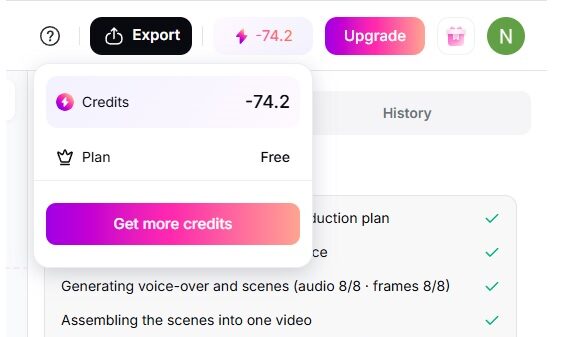
- Credit Burn Can Happen Fast: When testing the Blog-to-Video tool, it consumed all 20 of my free credits and pushed my balance into the negative to -74.2 credits. (Luckily it managed to complete the video generated and I can download it without any restriction.) That’s nearly 100 credits gone in a single test. I can’t imagine how quickly credits would run out on the Pro Plan, which offers 500 credits per month. At this rate, the monthly credits could be depleted after generating just five videos.
- AI Visual Selection Isn’t Always 100% Accurate: Like most AI generators, the automated B-roll or motion graphic picks can occasionally feel a bit random or off-context. You’ll still need to spend a few minutes reviewing and swapping out media clips manually to get it just right.
- Limited Deep Customization for Advanced Editors: If you’re used to full control over keyframes, complex audio mixing, or micro-level timeline adjustments like in Premiere Pro or DaVinci, CutBay might feel a bit too automated for complex post-production. It’s built for speed, not cinema-grade filmmaking.
.