CutBay AI

CutBay.ai Review: Is This AI Video Generator Actually Useful or Just Another Shiny Object?

If you’ve spent more than five minutes on the internet lately, you’ve probably noticed that everything needs to be a video now. Written a 2,000 word blog post..? Great, now turn it into a TikTok. Got a pitch deck..? Cool, where’s the animated presentation video..?

As someone who loves creating content but doesn’t particularly enjoy sitting in front of a timeline editor for six hours straight just to sync captions, I’m always on the lookout for tools that can do the heavy lifting for me.

Enter CutBay.ai – the latest AI video engine promising to transform almost any piece of text, document, or link into a fully polished video. But does it actually deliver, or is it just another overhyped AI tool..? Let’s break it down.

What Exactly is CutBay.ai?

In short, CutBay AI is designed to take the friction out of video production. Instead of starting with a blank canvas and scrambling to find stock media, voiceovers, or background music, CutBay uses AI to interpret your raw inputs, whether that’s a blog link, a PDF, or a PowerPoint presentation—and converts them into dynamic video content.

It effectively bridges the gap between “I have a great idea/document” and “Here’s a finished video ready to publish.”

The Feature Breakdown: What Can CutBay Actually Do?

CutBay groups its capabilities into two main categories: Create (the final format you want to produce) and Tools (the underlying AI engines that process your content).

Here is a look at the key AI Tools under the hood:

1. Turning Existing Content into Videos (Input to Video)

This is easily one of the most practical parts of the platform. Instead of rewriting everything from scratch, CutBay takes your existing assets and reimagines them visually:

  • Blog to Video & URL to Video: Have an article that did well..? Drop the link in, enter some command prompt and see the AI extracts key takeaways to build a short video summary. Here what I managed to test 😁
  • Product URL to Video: For e-commerce owners who don’t have time to hire a video editor for every single product listing—just paste the link and let it assemble a quick product highlight.
  • Document to Video, PDF to Video & Report to Video: If reading through a 20-page PDF report sounds painful, converting it into an explainer video makes digestible insights way easier to share with your team or audience.

YouTube Shorts Video: You just simply add or drag your image sources to the AI Shorts Agent and tell them how you want it done.

2. Smart Editing & Automation Tools

Beyond just ingesting files, CutBay packs several automated editing features to speed up your workflow:

  • Text to Video & Motion Graphic Generator: Type in a prompt or script, and the AI pulls relevant visuals, animations, and graphics to match the context of your story.
  • Add B-roll to Video & Auto Subtitles: We all know captions are mandatory now (since half the internet watches videos on mute anyway). The auto-subtitle tool paired with automatic B-roll selection saves a ridiculous amount of manual slicing and dicing.
  • Talking Head Video Editor: Perfect for online courses, tutorials, or vlog-style commentary where a central host or avatar guides the narrative.

You may also like: Flexclip Review – Comprehensive Analysis of Advantages, Disadvantages, Hidden Features

Output Formats: What Can You “Create”?

Depending on where you intend to publish, CutBay allows you to output videos tailored for specific channels and formats:

  • Short-Form Content: Perfect for social media engagement (YouTube Shorts, Photo Video, Intro Maker).
  • Business & Marketing: Great for driving sales or brand awareness (Marketing Video, Product Demo, Infographic Video, Slideshow Maker).
  • Education & Presentations: Ideal for breaking down complex topics (Education Video, Video Presentation, Typography Video, and Animated Charts for visual data).

The Verdict: Worth Trying Out?

If you’re a creator, marketer, or business owner who needs to maintain a consistent video presence without spending days inside heavy video editing software, CutBay.ai offers a genuinely smart shortcut.

Why it stands out:

  • Massive Time Saver: Going from a raw blog link or PDF directly to a video script with matching media in minutes is a game-changer.
  • A Lot of Free Templates: Feel lost, use their free templates to start with and simply edit from that.
  • Beginner-Friendly: You don’t need a degree in motion graphics to get something that looks clean and presentable.
  • Versatile Toolset: Covering everything from short-form clips to full presentations under one roof.
  • Free Plan to try: You can try with the available of 20 credits.

Predictable Downsides:

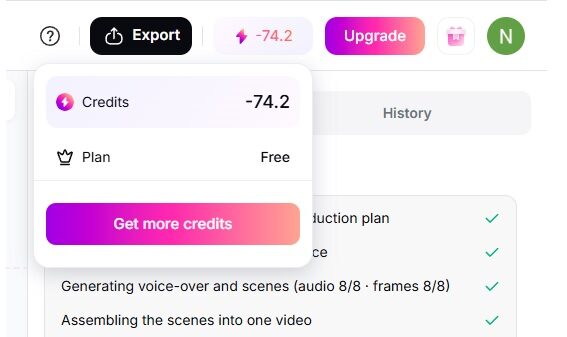
  • Credit Burn Can Happen Fast: When testing the Blog-to-Video tool, it consumed all 20 of my free credits and pushed my balance into the negative to -74.2 credits. (Luckily it managed to complete the video generated and I can download it without any restriction.) That’s nearly 100 credits gone in a single test. I can’t imagine how quickly credits would run out on the Pro Plan, which offers 500 credits per month. At this rate, the monthly credits could be depleted after generating just five videos.
  • AI Visual Selection Isn’t Always 100% Accurate: Like most AI generators, the automated B-roll or motion graphic picks can occasionally feel a bit random or off-context. You’ll still need to spend a few minutes reviewing and swapping out media clips manually to get it just right.
  • Limited Deep Customization for Advanced Editors: If you’re used to full control over keyframes, complex audio mixing, or micro-level timeline adjustments like in Premiere Pro or DaVinci, CutBay might feel a bit too automated for complex post-production. It’s built for speed, not cinema-grade filmmaking.

.

FlexClip AI Video Editor

FlexClip Review 2024: Comprehensive Analysis of Advantages, Disadvantages, Hidden Features

FlexClip AI Video Editor

In the ever-evolving digital landscape, the demand for video content continues to soar, with platforms like YouTube witnessing an astounding 500 million hours of video watched daily. Furthermore, videos have demonstrated unparalleled shareability, generating a staggering 1200% more shares on social media compared to text and image content combined. In light of these trends, businesses and marketers are increasingly recognizing the pivotal role of video creation in effectively engaging with their digital audience.

Traditionally, the creation of professional-quality video content was shrouded in complexity, requiring expensive tools and technical expertise, thereby limiting accessibility. However, the emergence of FlexClip in 2024 has heralded a new era of democratized video editing, making it accessible to users of all skill levels.

What is FlexClip?

Developed by PearlMountain Technology Co., Ltd. in China, FlexClip has swiftly ascended the ranks among content creators, marketers, and businesses worldwide. At its core, FlexClip serves as an online video maker and editing platform, offering a comprehensive suite of tools and features meticulously crafted to address a diverse array of video creation needs.

Key Features of FlexClip

Customizable Video Templates: With an extensive repository of over 1000 pre-made templates spanning various use cases, FlexClip empowers users with a myriad of options to kickstart their projects.

FlexClip Templates

Massive Stock Media Library: Boasting an impressive collection of over 1,000,000 royalty-free video clips, images, graphics, and music tracks, FlexClip ensures that users have access to a boundless reservoir of resources to elevate their videos.

AI-powered Editing Tools: Harnessing the power of artificial intelligence, FlexClip streamlines the editing process by offering innovative features such as text-to-video conversion and automatic subtitling.

Drag-and-drop Timeline Editing: With an intuitive drag-and-drop interface, users can effortlessly arrange and edit their video clips, transitions, effects, and overlays, fostering a seamless editing experience.

Audio Editing and Voice-over Recording: Recognizing the significance of audio, FlexClip provides users with advanced editing capabilities and a built-in voice-over recording tool, facilitating seamless narration.

Collaboration Tools and Cloud Storage: Through features like team projects, sharing, comments, and task management, FlexClip fosters collaboration among users, facilitating seamless teamwork on video projects.

Publishing & Analytics: FlexClip simplifies the process of publishing videos with one-click export options and detailed analytics to track performance, empowering users to optimize their content strategy.

FlexClip’s User Interface and Ease of Use

FlexClip UI

Distinguished by its user-friendly interface, FlexClip caters to users of all proficiency levels, offering a seamless editing experience characterized by a drag-and-drop approach. The interface is thoughtfully divided into sections such as the Media Library, Timeline, Preview Window, and Editing Tools, ensuring intuitive navigation and comprehension.

FlexClip’s Key Features and Capabilities

FlexClip Chroma Key

In addition to its core features, FlexClip encompasses a plethora of advanced tools powered by artificial intelligence, including text-to-video conversion, auto subtitles & captions, and smart video cropping. These innovative features not only streamline the editing process but also empower users to create professional-quality videos with unparalleled ease.

FlexClip’s Performance and Output Quality

FlexClip 4K Video quality

Leveraging cloud-based rendering, FlexClip ensures swift performance and high-quality output, supporting various video resolutions, including 1080p and 4K. Furthermore, the platform offers multiple export options to cater to diverse needs, delivering sharp and clear videos suitable for professional applications.

AI-Powered Editing Tools

Incorporating artificial intelligence to accelerate mundane production tasks is a growing trend across creative platforms. FlexClip offers cutting edge AI functionality to simplify the video creation process.

Rather than needing to storyboard shots manually, just type up a narrative script and let FlexClip’s AI automatically generate an entire video from text. This includes:

  • Shot selection from stock library
  • Animated text matching script narrative
  • Background music pairing
  • Professional scene transitions
  • Text to speech conversion (95 languages)

It only takes seconds to produce an initial AI-powered video. Refine from there or use as a baseline to build upon.

Struggling to conceptualize what a marketing or social media video should even cover? Describe the general topic and target audience and FlexClip will auto-generate an entire script outline incorporating SEO best practices – perfect to then transform into a video.

Manual transcription and caption creation takes forever. FlexClip’s AI can listen to video dialogue and automatically generate subtitles and closed captions – crucial for improving video accessibility.

  • Text to Speech: With the text-to-speech feature, users can easily add voiceovers to their videos by simply inputting text, which the AI will convert into natural-sounding speech.
  • AI Image Generator: Need a specific image for your video? FlexClip’s AI image generator can create custom visuals based on your prompts.
  • Background Remover: Easily remove backgrounds from images and videos with FlexClip’s AI-powered background removal tool.
  • Smart video cropping
  • AI-powered color grading
  • Photo animation effects
  • AI translator:translates the video content into another language

You may also like: Flexclip Free Video Editor That Easily Create Stylish Video Online

FlexClip’s Pricing & Plans

FlexClip adopts a flexible pricing model tailored to accommodate the needs of different users. While the free plan serves as a stepping stone for beginners, the Plus and Business plans cater to individuals, small businesses, and larger teams or enterprises, offering advanced features and capabilities commensurate with varying requirements.

Pros
  • User-friendly interface
  • AI-powered features
  • Competitive pricing plans
  • Over 4 million stock media
Cons
  • Watermark on free plan

Conclusion

In conclusion, FlexClip emerges as a versatile and user-friendly video editing platform that empowers users of all proficiency levels to create professional-quality videos. With its comprehensive suite of features, intuitive interface, and competitive pricing, FlexClip epitomizes accessibility and innovation in the realm of video editing, poised to retain its position as a preferred choice for video creators in 2024 and beyond.