FlexClip AI Video Editor

FlexClip Review 2024: Comprehensive Analysis of Advantages, Disadvantages, Hidden Features

FlexClip AI Video Editor

In the ever-evolving digital landscape, the demand for video content continues to soar, with platforms like YouTube witnessing an astounding 500 million hours of video watched daily. Furthermore, videos have demonstrated unparalleled shareability, generating a staggering 1200% more shares on social media compared to text and image content combined. In light of these trends, businesses and marketers are increasingly recognizing the pivotal role of video creation in effectively engaging with their digital audience.

Traditionally, the creation of professional-quality video content was shrouded in complexity, requiring expensive tools and technical expertise, thereby limiting accessibility. However, the emergence of FlexClip in 2024 has heralded a new era of democratized video editing, making it accessible to users of all skill levels.

What is FlexClip?

Developed by PearlMountain Technology Co., Ltd. in China, FlexClip has swiftly ascended the ranks among content creators, marketers, and businesses worldwide. At its core, FlexClip serves as an online video maker and editing platform, offering a comprehensive suite of tools and features meticulously crafted to address a diverse array of video creation needs.

Key Features of FlexClip

Customizable Video Templates: With an extensive repository of over 1000 pre-made templates spanning various use cases, FlexClip empowers users with a myriad of options to kickstart their projects.

FlexClip Templates

Massive Stock Media Library: Boasting an impressive collection of over 1,000,000 royalty-free video clips, images, graphics, and music tracks, FlexClip ensures that users have access to a boundless reservoir of resources to elevate their videos.

AI-powered Editing Tools: Harnessing the power of artificial intelligence, FlexClip streamlines the editing process by offering innovative features such as text-to-video conversion and automatic subtitling.

Drag-and-drop Timeline Editing: With an intuitive drag-and-drop interface, users can effortlessly arrange and edit their video clips, transitions, effects, and overlays, fostering a seamless editing experience.

Audio Editing and Voice-over Recording: Recognizing the significance of audio, FlexClip provides users with advanced editing capabilities and a built-in voice-over recording tool, facilitating seamless narration.

Collaboration Tools and Cloud Storage: Through features like team projects, sharing, comments, and task management, FlexClip fosters collaboration among users, facilitating seamless teamwork on video projects.

Publishing & Analytics: FlexClip simplifies the process of publishing videos with one-click export options and detailed analytics to track performance, empowering users to optimize their content strategy.

FlexClip’s User Interface and Ease of Use

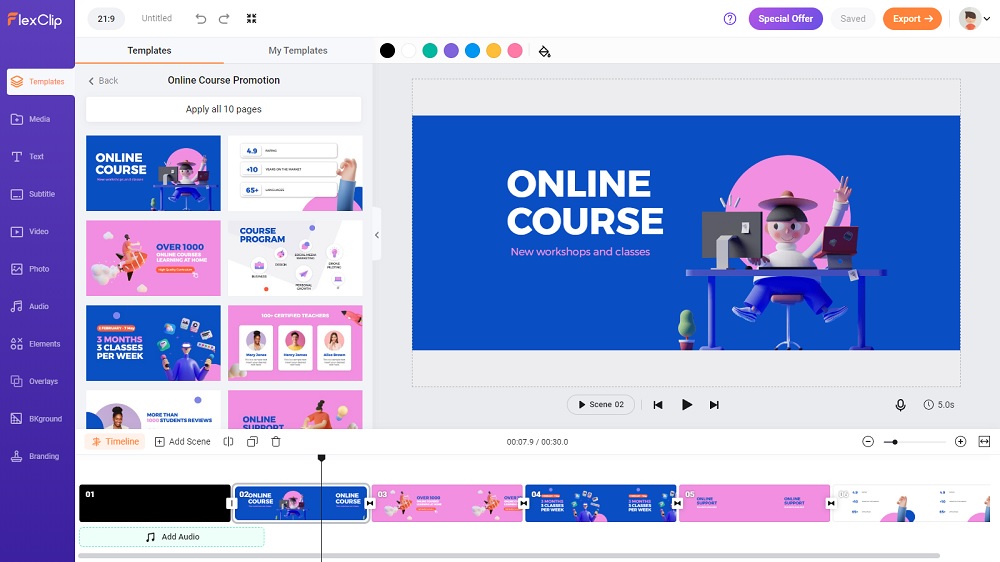
FlexClip UI

Distinguished by its user-friendly interface, FlexClip caters to users of all proficiency levels, offering a seamless editing experience characterized by a drag-and-drop approach. The interface is thoughtfully divided into sections such as the Media Library, Timeline, Preview Window, and Editing Tools, ensuring intuitive navigation and comprehension.

FlexClip’s Key Features and Capabilities

FlexClip Chroma Key

In addition to its core features, FlexClip encompasses a plethora of advanced tools powered by artificial intelligence, including text-to-video conversion, auto subtitles & captions, and smart video cropping. These innovative features not only streamline the editing process but also empower users to create professional-quality videos with unparalleled ease.

FlexClip’s Performance and Output Quality

FlexClip 4K Video quality

Leveraging cloud-based rendering, FlexClip ensures swift performance and high-quality output, supporting various video resolutions, including 1080p and 4K. Furthermore, the platform offers multiple export options to cater to diverse needs, delivering sharp and clear videos suitable for professional applications.

AI-Powered Editing Tools

Incorporating artificial intelligence to accelerate mundane production tasks is a growing trend across creative platforms. FlexClip offers cutting edge AI functionality to simplify the video creation process.

Rather than needing to storyboard shots manually, just type up a narrative script and let FlexClip’s AI automatically generate an entire video from text. This includes:

  • Shot selection from stock library
  • Animated text matching script narrative
  • Background music pairing
  • Professional scene transitions
  • Text to speech conversion (95 languages)

It only takes seconds to produce an initial AI-powered video. Refine from there or use as a baseline to build upon.

Struggling to conceptualize what a marketing or social media video should even cover? Describe the general topic and target audience and FlexClip will auto-generate an entire script outline incorporating SEO best practices – perfect to then transform into a video.

Manual transcription and caption creation takes forever. FlexClip’s AI can listen to video dialogue and automatically generate subtitles and closed captions – crucial for improving video accessibility.

  • Text to Speech: With the text-to-speech feature, users can easily add voiceovers to their videos by simply inputting text, which the AI will convert into natural-sounding speech.
  • AI Image Generator: Need a specific image for your video? FlexClip’s AI image generator can create custom visuals based on your prompts.
  • Background Remover: Easily remove backgrounds from images and videos with FlexClip’s AI-powered background removal tool.
  • Smart video cropping
  • AI-powered color grading
  • Photo animation effects
  • AI translator:translates the video content into another language

You may also like: Flexclip Free Video Editor That Easily Create Stylish Video Online

FlexClip’s Pricing & Plans

FlexClip adopts a flexible pricing model tailored to accommodate the needs of different users. While the free plan serves as a stepping stone for beginners, the Plus and Business plans cater to individuals, small businesses, and larger teams or enterprises, offering advanced features and capabilities commensurate with varying requirements.

Pros
  • User-friendly interface
  • AI-powered features
  • Competitive pricing plans
  • Over 4 million stock media
Cons
  • Watermark on free plan

Conclusion

In conclusion, FlexClip emerges as a versatile and user-friendly video editing platform that empowers users of all proficiency levels to create professional-quality videos. With its comprehensive suite of features, intuitive interface, and competitive pricing, FlexClip epitomizes accessibility and innovation in the realm of video editing, poised to retain its position as a preferred choice for video creators in 2024 and beyond.

VideoPad Free Video Editing Software No Watermark

Best Free Video Editing Software Without Watermark For PC

It’s quite impressive that some Free Video Editing Software available out there are so good and have been starred as Hollywood standard video editor by many reviews. In fact many people perhaps don’t even know that these free tools have been used to produce many famous Hollywood movies that you may think of it. For that reason, we managed to look around among the Best Free Video Editing Software Without Watermark For PC and we listed here 9 of them.

The best according to us most importantly, consist of premium quality and feature rich tools of a video editor. It must be no watermarked, no video time limit and most important thing, free to be use & to publish as well. Extra advantages, such as Ultra HD or UHD or 4K video quality supports, etc, consider bonus.

Table of Contents

  1. Lightworks
  2. VSDC
  3. DaVinci Resolve
  4. Movavi
  5. Blender
  6. Shotcut
  7. OpenShot
  8. HitFilm Express
  9. VideoPad
  10. ActivePresenter 7
  11. FlexClip
  12. Windows Movie Maker
  13. iMovie

1.  Lightworks – Free Video Editing Software

Lightworks Free Video Editing Software No Watermark

Lightworks is a professional level free video editing software we can say. With many interesting premium features available in the free version. Did you know that this tool has been used for editing popular Hollywood movies like The Wolf of Wall Street, Pulp Fiction, Mission Impossible and many more. EditShare, the developer of this intuitive software claimed that Lightworks offers this Free license version with all the tools available, but the only restriction is on output formats.

“By far the most powerful free video editor around, Lightworks democratizes filmmaking by putting premium tools within reach of everyone” – TechRadar

  • ✔️ Pro:
    • Length: No limit
    • No Watermark, No Ads
    • Almost all the pro tools in this free app
    • Online support: Forum community
  • Con:
    • Output: Youtube & Vimeo at 720p only
    • The interface might not be user friendly
    • Recommended PC requirement could be too high
  • For:      

Download


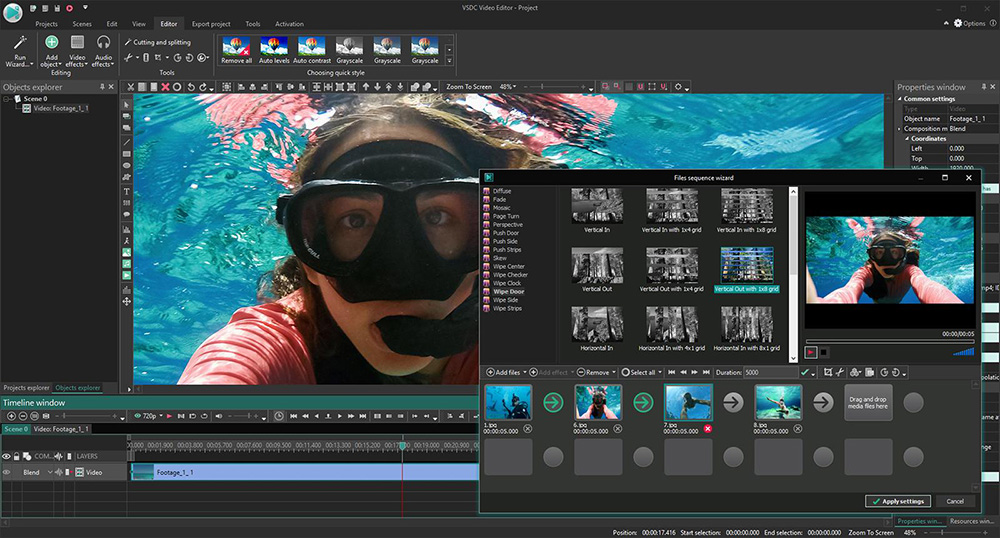
2.  VSDC Free Video Editor

VSDC Free Video Editing Software No Watermark

VSDC has been listed among first rank in the list of best free video editor for PC in many review sites. The easy to use VSDC interface is capable to assist beginners. Such as marketing professionals in creating product demos and how to use videos to improve the knowledge base of their audience. No watermark on edited videos and the quality of edited videos are quite impressive. This software supports a wide range of file formats. So that users can create free tutorials and post them on different websites online. Above all, it’s recommended for beginner.

  • ✔️ Pro:
    • Length: No limit
    • No Watermark, No Ads
    • 4K UHD support
    • Built-in Screen Recorder, Chroma key for Green screen, Color twist, Time lapse
    • Simple & easy to use interface
    • Online support: Website
  • Con:
    • No advance setting
    • No hardware acceleration
    • Windows’ users only
  • For:  

Download


3.  DaVinci Resolve – Free Video Editing Software

DaVinci Resolve at first sounds like it got nothing to do with video editing. However this bizarre yet catchy name is a professional level free video editing software. With award-winning image processing technology, DaVinci Resolve provides editing module, color correction, audio effects & visual effects all in one app. The developer claimed that DaVinci Resolve (latest to date is version 16), as an innovative tools as a free video editor. It have the revolutionary new cut page, visual effects, motion graphics, fusion 3D, color correction and audio post production, all in a single application.

  • ✔️ Pro:
    • Length: No limit
    • No Watermark, No Ads
    • 4K UHD support
    • All the tools for professional video editing in one.. except most of the FX
    • Online support: Comprehensive Training on website – videos, ebooks & real books
  • Con:
    • Not for amateur or beginner
    • Many intuitive effects are for paid version
  • For:      

Download

You may also like to read 13 Free Screen Recording Softwares


4. Movavi Video Editor

Movavi Video Editor

Movavi Video Editor stands out as a reliable video editing tool for YouTube creators, compatible with both MacOS and Windows operating systems. With Movavi, you can seamlessly remove audio from your videos in mere seconds, allowing you to repurpose the content for other purposes. Best of all, this feature is available at no cost in Movavi’s free version. Additionally, Movavi offers the flexibility to add voiceovers, sound effects, or music to your videos, enhancing your content creation process and empowering YouTubers to craft polished videos without imperfections.

Download


5.  Blender – Video Editor

Blender Free Video Editing Software No Watermark

Blender was known as an open source and definitely free 3D creation software. Built for 3D modelling, animation, simulation, rendering, compositing, motion tracking and even for game creation. Besides all of those state-of-the-art creation tools, Blender also comes with a built-in video editor. This video sequence editor, as they call it, will allows you to perform basic video editing, as well as more complex tasks like video masking or color grading.

  • ✔️ Pro:
    • Length: No limit
    • No Watermark, No Ads
    • 4K UHD support
    • Live preview, Luma Waveform, Chroma Vectorscope, Audio Mixing & Waveform Visualization, Speed control, Adjustment layers, Transitions, Keyframes, Filters
    • 32 Slots available for adding Video clips, Audio clips, Images, Effects (you can produce some incredibly complex video)
    • Full install or Portable supported (easy mobile)
    • Online support: Documentation, Tutorials, Community Forum, Professional support for Developer & Certified Trainer
  • Con:
    • It’s more on 3D modeling & animation creation suite
    • The interface are too technical for beginners
    • Require Graphics Card with 1 GB RAM & OpenGL as minimum spec, in other words, not for low or medium spec PC
  • For:      

Download


6.  Shotcut

Shotcut Free Video Editing Software

Shotcut is an open source free video editor, so for open source apps lover, here is one of your choice for free video editing. Shotcut offers impressively wide range of file formats. It offers awesome video & audio effects and variable frame rates. Even though this is an open source video editor, many reviews admits that it has less negative side. In other words, a must try for beginner.

“It is very close to professional video editing programs like VEGAS Pro or the easiest video editor in the world, Filmora Video Editor” – Elearning Supporter

  • ✔️ Pro:
    • Length: No limit
    • No Watermark, No Ads
    • 4K UHD support
    • Chroma key for Green screen, 3D Text, Color correction, Invert color, Transition effects, Blur effect, Overlay
    • Wide range of format supported
    • Online support: Video tutorials & forum
  • Con:
    • little crashes
  • For:      

Download


7.  OpenShot Video Editor

As the name given, OpenShot is an another great open source free video editor software for beginners level we can say. When it’s from open source development, means you can expect freedom of use, no limitation and good support from the community. But it doesn’t mean it is the best option though. OpenShot offers an easy to use and quick to learn video editor, perfect for beginners and amateur video producer.

  • ✔️ Pro:
    • Length: No limit
    • No Watermark, No Ads
    • 4K UHD support
    • Key Frame Animation, Desktop integration Drag & Drop, Unlimited Tracks / Layers, 3D Animated Titles, Audio mixing
    • User friendly Interface
    • Online support: Website & Reddit OpenShot forum
  • Con:
    • Open source software needs patience to get support or update of bugs issue
    • Many users complaint about lags when applying effects and even worse for some users when it tend to crash
  • For:      

Download


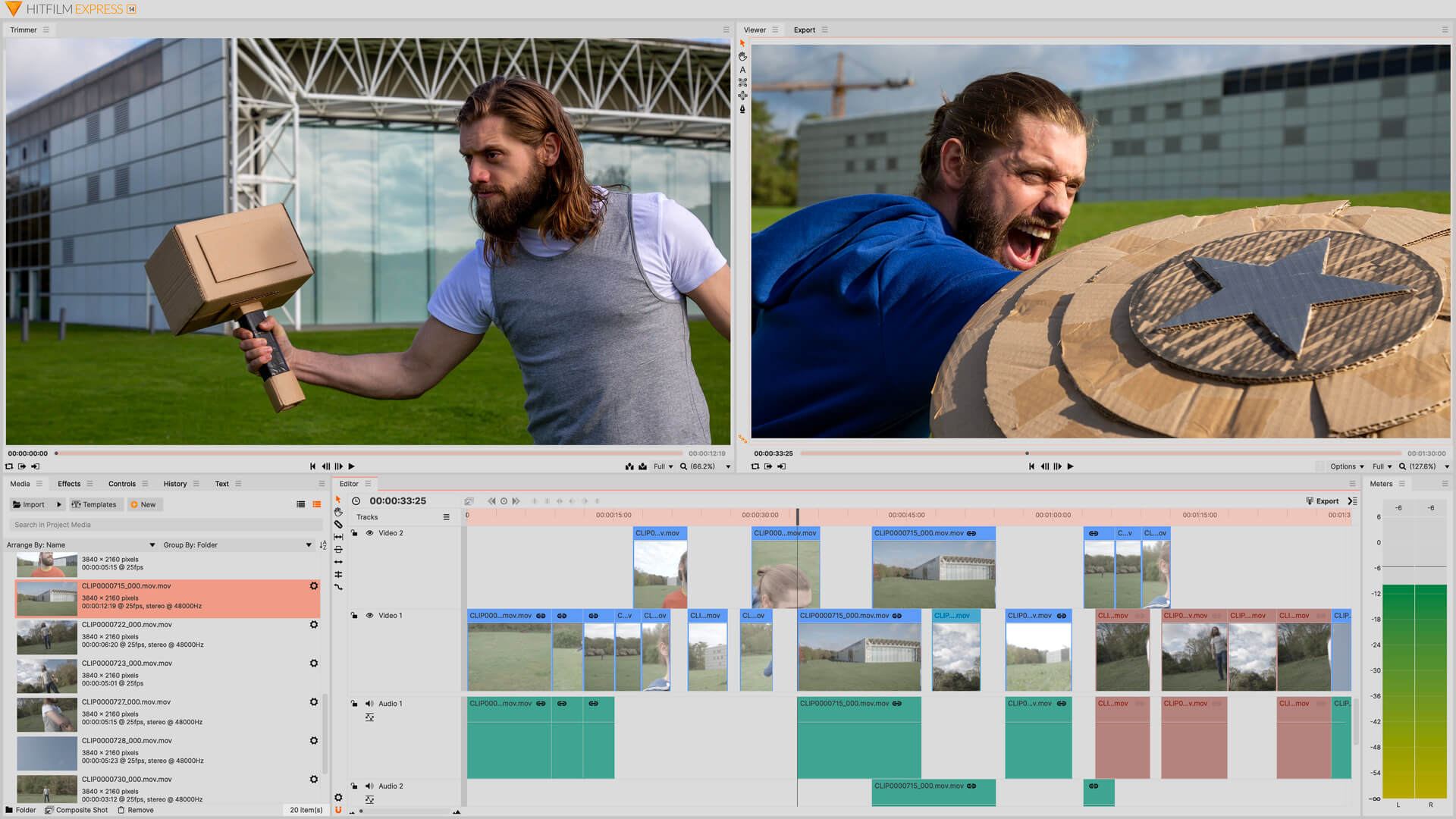
8.  HitFilm Express

HitFilm Express is the free version of HitFilm Pro. As the name given, the developer, FXhome claimed that HitFilm Express is the most powerful free video editing & VFX software in the world. If you’re really serious into video making, this free video editor is a must try for you to make your first step towards becoming a pro film maker. For instance, if you’re a film making student, this app is perfect for you before you fully jump in the film industry. Then when you become a professional film maker, the advance – paid version is still at affordable price.

  • ✔️ Pro:
    • Length: No limit
    • No Watermark, No Ads
    • 4K UHD support (need 2GB video memory)
    • 2D Tracking, 3D & 360° Support (but add-ons required to buy), 400+ Effects & Presets
    • Online support: Website support, tutorial & forum
  • Con:
    • You’ll need high-end machine
    • Even though your system may support to run this software but slow loading for importing & exporting process may occur
    • Most of the extra features are lock as paid add-ons
  • For:    

Download


9.  VideoPad

VideoPad Free Video Editing Software No Watermark

VideoPad received many good reviews and we agree that it is one of the great free video editor available. VideoPad consist of feature packed editing tools with variety of video formats supported. It’s not just lets you import directly from your camcorder, in fact it has the ability to burn to DVD, besides having all the standard editing features. You will find many good reviews about this intuitive free video editing tools. So, if you’re beginner, this free tool is recommended for you.

  • ✔️ Pro:
    • Length: No limit
    • No Watermark, No Ads
    • 4K UHD support
    • Drag & drop, 3D & 360° Editing, Caption Overlay, Video Stabilization, Easy narration, Built-in Sound effects, Color control
    • Simple & Easy to understand Interface
    • Online support: Website Tutorials
  • Con:
    • Free version only for personal use and non commercial!
    • In other words, you must go for paid version for business purpose
  • For:    

Download


10.  ActivePresenter 7

The developer, Atomi System, claimed that ActivePresenter offers all in one video tool. For instance, it have the tools needed from built-in screen recorder, annotate, edit screen cast videos and create interactive eLearning contents in HTML5. So you get the idea how this free editor may suits your editing requirement. It has the ability to edit almost any video input files and have all basic & advance editing video packages.

  • ✔️ Pro:
    • Length: No limit
    • No Watermark, No Ads
    • 4K UHD support
    • Chroma key for Green Screen, Blur effect, Picture in picture, Text-to-speech
    • Online support: User community (forum) & tutorials
  • Con:
    • Watermark when export to other formats
    • Video editing is too basic, made for learning video or tutorial making
  • For:    

Download


11.  FlexClip

Free Online Video Editor

A free web based video editing tool, FlexClip is another easily drag & drop video editor. After trying its basic features, we can say that FlexClip is a flexible and smart video creating tool. User friendly interface and it is a service that challenges how far video can be edited online. Most users prefer online image editing just like Canva, Pixlr, so the demand for online video editing tool will continue to increase as well. FlexClip is a recommended video editing tool that you can access anytime, anywhere, on any device and it will completes your content creations requirement.. find it out yourself !

  • ✔️ Pro:
    • Online (web based) – No high-spec PC or download software needed

    • Easy to use, drag & drop interface

    • The web browser works smoothly even when handling heavy videos

    • Free version available (also reasonable price for Paid versions)

    • Up to date functions & variety of features available

    • Fast video encoding

    • Abundant video / image / music materials

  • Con:
    • Export videos takes time
    • Few illustration based templates
    • You need to be connected online to use it
  • For:    

Find out


Video Editor For Windows  

12.  Windows Movie Maker

Windows Movie Maker, a very familiar video editing software among Windows users since it was introduced with Windows XP integration. This free video editor was pre-installed in the Windows operating system until 2017, which is, Windows 8 as the last known OS version. Then it was discontinued by Microsoft. The OS company decided to replace it with the new app called Windows Photo & Movie Editor in Windows 10. However, for some of you who prefer the Windows Movie Maker instead of the new one, you can still download it from third party provider below.

Download


.

Video Editor For Apple OS  

13.  iMovie

A well known free video editor for iOS platform – iMovie let you use it on your Mac PC, iPad, iPhone or you can sync among all your iOS gadgets. iMovie is one of the featured app in Pixpa’s top video editing apps. So lets start your creativity with this one of the best free app and an editor’s choice app by Apple.

Download

.

We would also like to add the famous, an easy to use Wondershare Filmora free video editor in the list above. But it does not meet our ‘no watermarked’ requirement, as we mentioned earlier. Unless you don’t mind to have your video output to have watermarked by Filmora. Besides that, it’s an intuitive free video editing software with user & beginner friendly and a lot of ready made effects.

In conclusion, there are actually many more free video editors you can find out there. But as we said earlier, we list down some of the best in the class of free to use, no limitation, no watermarked, acceptable editing features and as well as good export quality. Moreover, the most important thing, every user can get the jobs done, satisfactory.

Anyway, we feel the need to share an another category, the free online video editor. These are apps that you don’t even need to install on your system but, use it online instead. Maybe we will cover one by one in our next post, hopefully :)

Free Online Video Editor

• MovieMaker – moviemakeronline.com
• Video Toolbox – videotoolbox.com
• Clipchamp – clipchamp.com/en/video-editor
• WeVideo – wevideo.com
• Online Video Cutter – online-video-cutter.com

Do we missed something better? Please share with us in the comment box below.